Modern ERP Should Manage Execution, Not Just Records

Summary
×Many companies still understand ERP mainly as a system for orders, inventory, purchasing, invoices, customers, and financial records. These capabilities matter because companies need consistent data, structured processes, and reliable business records. But in daily operations, leadership often needs to know where an issue is stuck, who owns it, when it may affect delivery, and whether it should escalate. If ERP remains only at the record level, data may be stored correctly while execution risk still moves between teams.
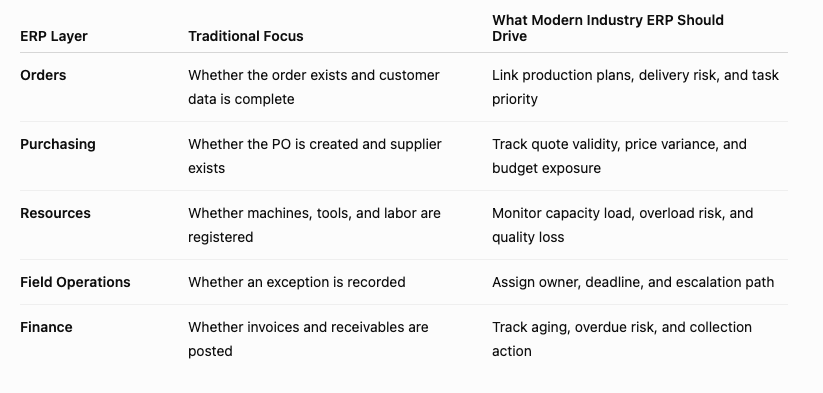
The value of modern ERP is shifting from recording what happened to driving what should happen next. After an order is created, the system should continue connecting production tasks, resource capacity, and delivery risk. After a purchasing need appears, the system should continue checking supplier quotes, validity, and budget exposure. After an invoice is issued, the system should continue tracking aging, overdue risk, and collection action. As industry-specific ERP software, Industry Software does not only help companies store data; it helps teams turn data into tasks, exceptions, rules, owners, and management decisions.
ERP Value Is Moving from System of Record to System of Execution
Traditional ERP focuses on the accuracy of business facts: whether an order is created, inventory is updated, purchasing is recorded, and invoices are issued. This data foundation is essential, but data alone does not drive execution. An order in the system does not mean capacity is ready. A purchase order does not mean supplier pricing is still valid. An invoice posted to receivables does not mean collection risk is being managed. Companies need the system to keep moving from record to status, responsibility, and action.
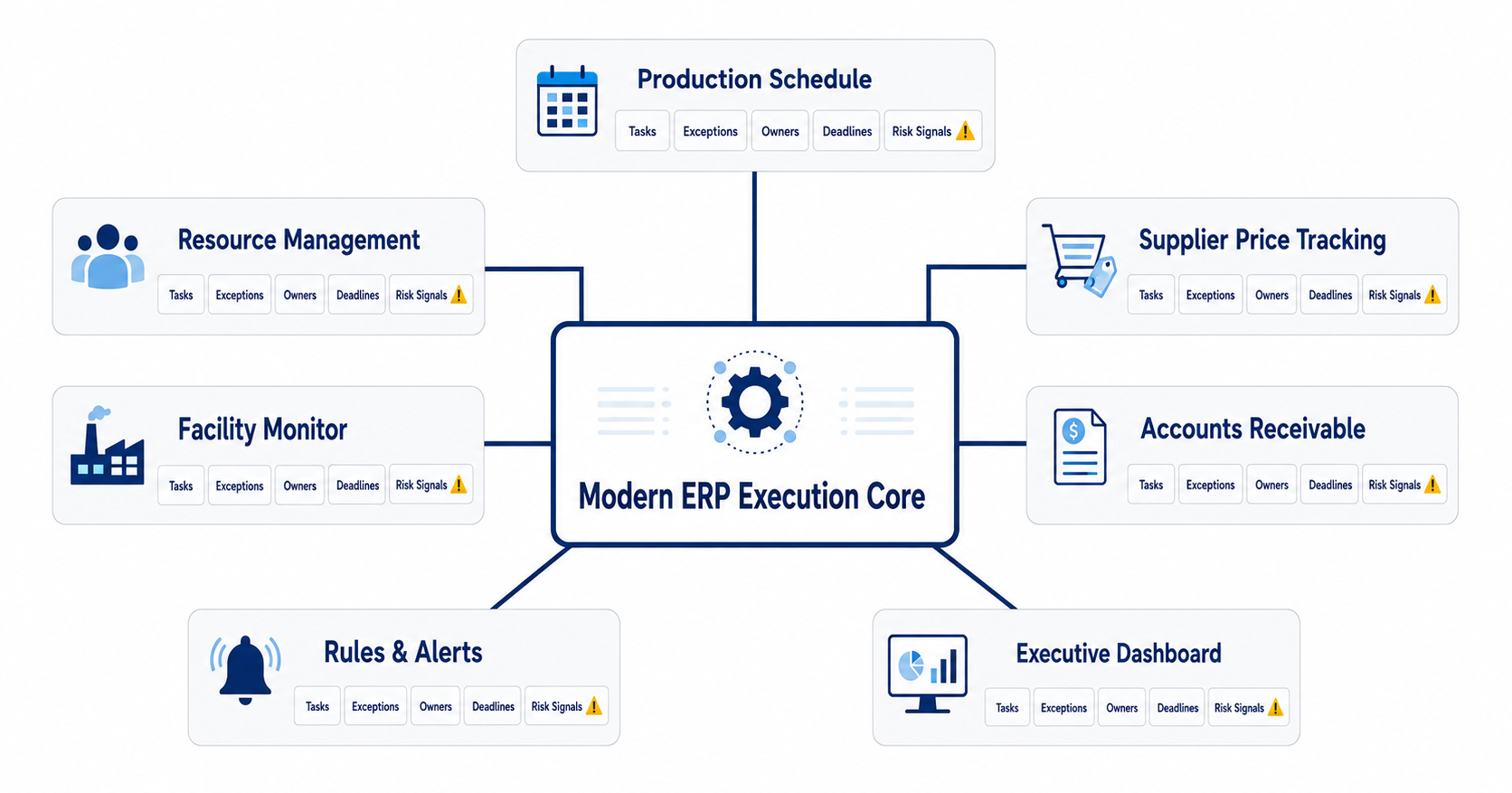
Execution-focused ERP connects business records with operating actions. Production Schedule should not only show jobs; it should identify delayed jobs and delivery risks. Resource Management should not only list machines and tools; it should surface utilization, capacity gap, and scrap risk. Supplier Price Tracking should not only store supplier quotes; it should detect quote validity, Price Spread %, and Budget Exposure. Accounts Receivable should not only record open balances; it should show aging, overdue amount, and collection risk. Industry Software brings these workflows into one ERP logic so records continue into execution, exceptions, and decisions.
Modern ERP should not force each department to create its own spreadsheet to explain system data. Planners adjust schedules offline, buyers save quotes in emails, field teams track exceptions in chat threads, and finance teams maintain separate high-risk customer lists. These workarounds may help temporarily, but they rarely create shared accountability or a stable operating rhythm. Industry Software brings these actions back into the ERP workflow so data, status, rules, and accountability can close the loop inside the system.
Industry ERP Must Fit Real Workflows, Not Only Generic Fields
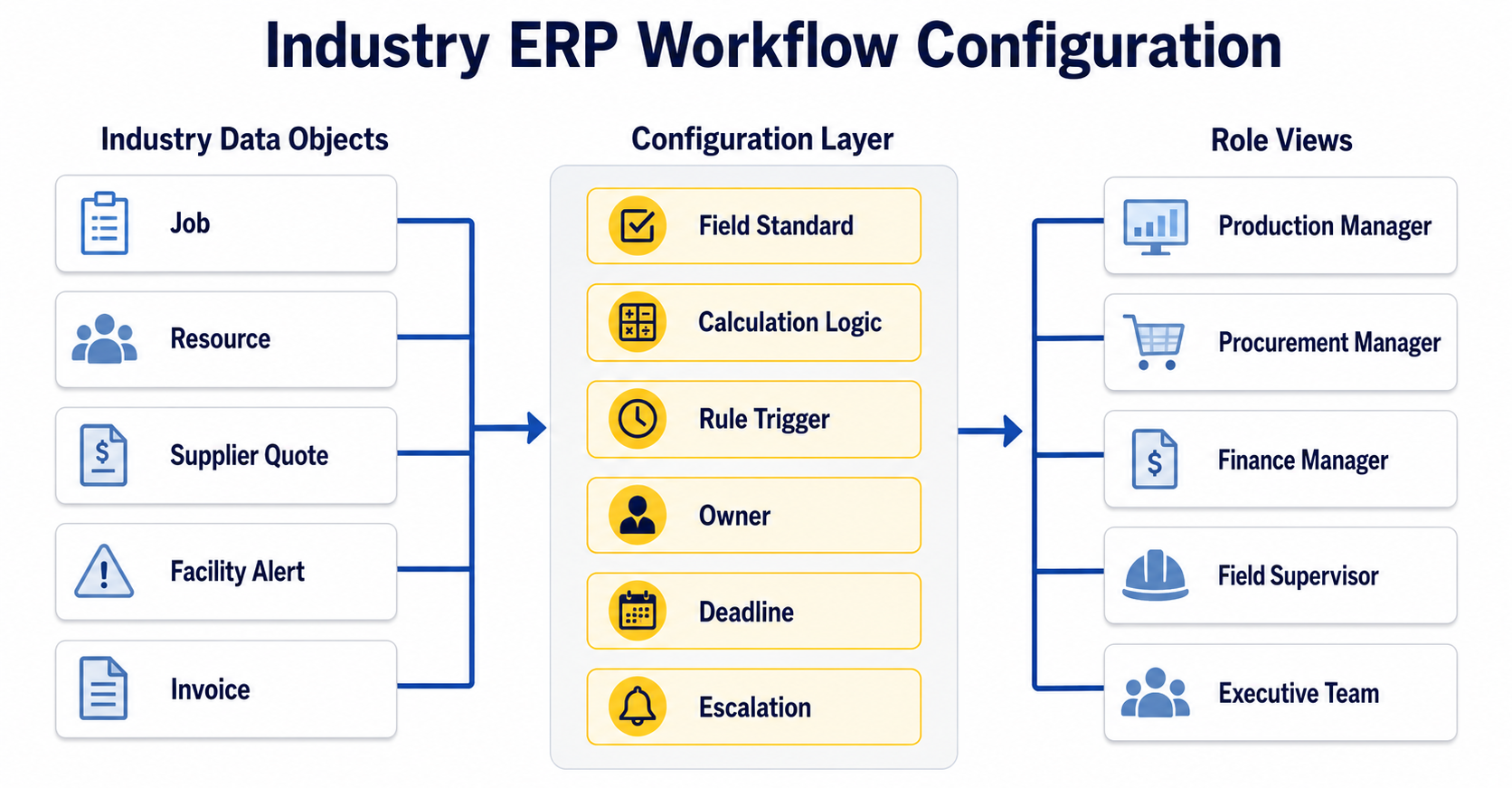
Different industries may all need orders, purchasing, inventory, invoices, and reports, but management value depends on how those fields enter real workflows. Project-based companies care about quote validity and Budget Exposure. Equipment-intensive operations care about resource load and scrap. Field service teams care about alert aging and response time. Finance teams care about overdue AR and customer payment behavior. Generic fields can show where data exists, but industry workflows show when that data must be handled.
Industry Software’s ERP logic supports workflow-specific configuration. Companies can place supplier quotes, resource load, job schedules, facility alerts, and AR aging into the right modules, then use configurable rules and role-based dashboards to give each role the right risk view. Procurement users see expired quotes and price variance, production leaders see resource bottlenecks and delayed jobs, finance managers see collection risk, field supervisors see overdue exceptions, and executives see cross-process risk. ERP becomes more than a shared database; it becomes a shared execution language.
This industry-specific configuration also reduces repeated cross-team explanation. “Usable quote” does not simply mean a quote exists; it means quote date, expiry date, unit, price basis, and supplier terms follow defined rules. “Available resource” does not only mean a machine is listed; it means supply hours, load hours, maintenance window, and quality risk are within an acceptable range. “Closed exception” does not only mean the status changed to closed; it means owner, resolution, timestamp, and impact review are recorded. The advantage of industry ERP appears in these specific operating judgments.
Data Becomes a Management Signal Only When It Enters Rules
Companies often want better data visibility, but visibility alone does not create execution. A red number may show that something is wrong, but it may not explain why it matters, who should act, when it should be handled, or whether it should escalate. Modern ERP should not simply show more data. It should move critical data into rules. When data connects with trigger, threshold, owner, deadline, and action, it becomes a management signal instead of static information.
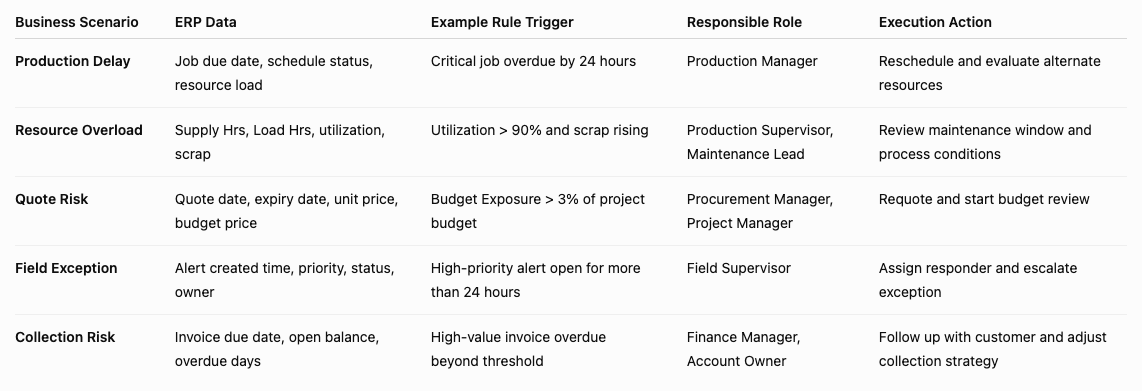
Industry Software can turn key fields from different modules into executable rules. Critical resource utilization above 90% for three consecutive days can trigger capacity risk. Budget Exposure above 3% of project budget can trigger budget review. A high-priority facility alert open for more than 24 hours can trigger escalation. Overdue AR above a customer threshold can trigger collection follow-up. Rules should not create more noise; they should bring important risk to the correct role earlier.
This logic can be summarized as ERP Execution Signal = Business Data + Rule Trigger + Responsible Role + Required Action. Business Data shows where the signal comes from. Rule Trigger defines when it matters. Responsible Role defines who owns it. Required Action defines what should happen next. Industry Software embeds this logic across production, procurement, resource, field, and finance workflows so each team can act on the right risk inside ERP.
Modern ERP Should Surface Risk Earlier, Not Wait for Month-End Review
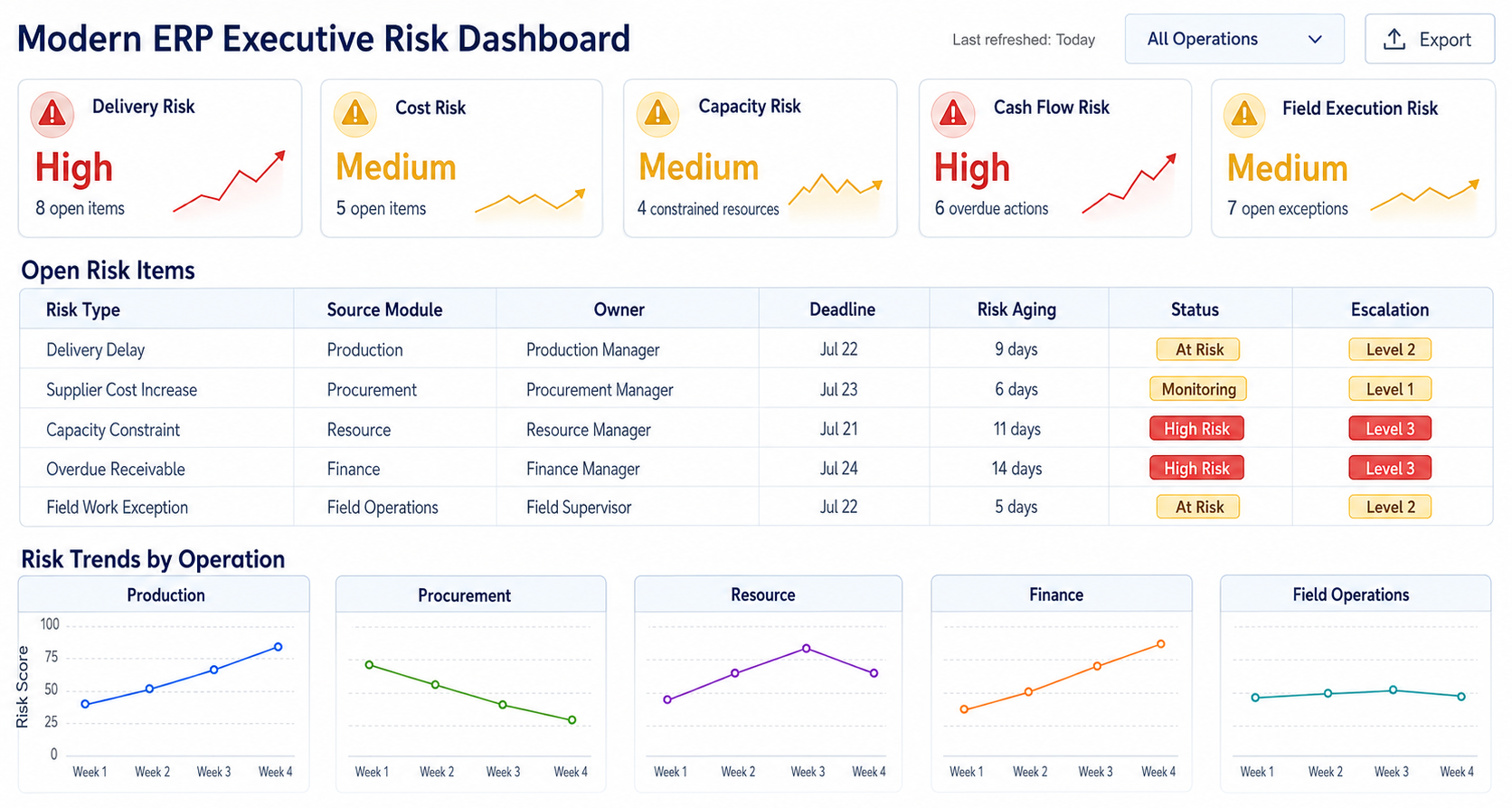
Many companies still depend heavily on monthly review. Monthly reports can explain what happened, but they are often too late to prevent risk from expanding. Production delays, expired quotes, resource bottlenecks, field exceptions, and overdue receivables usually do not appear suddenly at month end. They appear first as local signals. If the system does not organize these signals into a risk view, leadership can only investigate after the result has already happened.
Industry Software can move these early signals into the right view through executive dashboards, role-based views, and risk aging. Executives do not need to inspect every order, quote, machine, invoice, or field record every day. They need to see which risks are crossing thresholds, which risks have owners, and which risks are overdue. Production teams continue managing schedules, procurement teams maintain quotes, finance teams follow receivables, and field teams close exceptions, while leadership sees cross-process priorities. This is ERP for daily operations, not only month-end reporting.
Early risk signals can also be quantified through simple indicators. Production Schedule can track Capacity Gap = Required Production Hours - Available Production Hours. Resource Management can track Utilization = Load Hrs / Supply Hrs × 100% and scrap rate. Supplier Price Tracking can track Budget Exposure = (Latest Valid Price - Budget Unit Price) × Remaining Quantity. Accounts Receivable can track Overdue AR % = Overdue AR / Total Open AR × 100%. Facility Monitor can track Alert Aging = Current Time - Alert Created Time. These indicators do not make ERP more complicated; they help risk enter management discussion earlier and more clearly.
A Four-Week Launch Path: Start with One High-Impact ERP Workflow
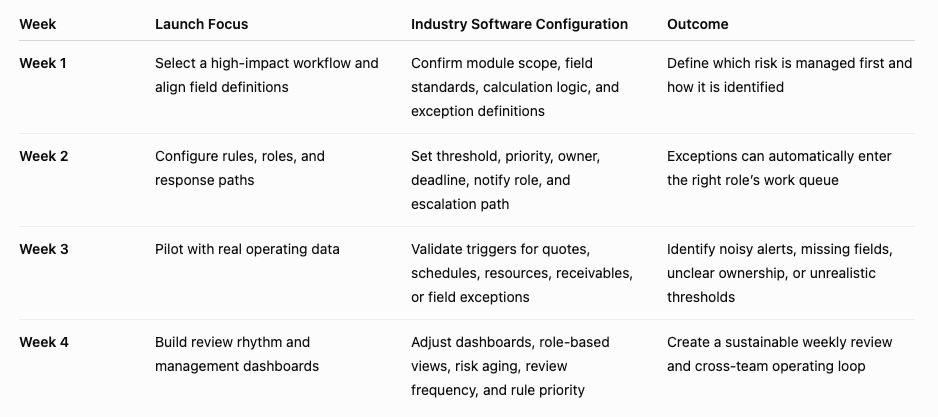
Modern ERP does not need every module fully deployed before it starts improving execution. A more practical approach is to select one high-impact workflow and use four weeks to align field definitions, configure rules, assign ownership, and build a management view. A project-based company may start with supplier quote to budget risk. An equipment-intensive company may start with production schedule to resource load. A field operations team may start with facility exception to accountability closure. A finance-focused rollout may start with invoice to collection risk. A working loop in one process builds more trust than a broad rollout with no clear action path.
Week one focuses on process selection and field definitions. The company defines which operating risk matters first and which fields are required. Quote risk may need supplier, item description, unit price, quote date, expiry date, budget unit price, and remaining quantity. Resource risk may need resource type, supply hours, load hours, utilization, scrap, and maintenance window. Receivables risk may need invoice due date, open balance, customer terms, overdue days, and collection status. Once definitions are aligned, ERP rules and dashboards have a reliable foundation.
Week two configures rules and roles. Industry Software can set thresholds, priorities, owners, deadlines, notify roles, and escalation paths based on the company’s process. Week three pilots with real business data to check whether alerts are too frequent, thresholds are realistic, owners are accurate, and dashboards support management judgment. Week four establishes a review rhythm, with department owners using role-based dashboards and executives reviewing the risk view. At that point, ERP go-live means more than “the system is available”; it means the management action is working.
The Long-Term Value of Industry ERP Is a Stable Execution Rhythm
Enterprise software should not be evaluated only by feature count. The deeper question is whether it changes daily management rhythm. Who owns what, what counts as an exception, how quickly it must be handled, when it should escalate, and which indicators reach executives all determine whether ERP truly enters the operating core. Industry Software places these management rules inside the system through configurable workflows, rules, alerts, role-based dashboards, and executive views, instead of leaving them only in meetings and policy documents.
Over time, ERP can also become a source of management improvement. The system can show which exceptions repeat, which owners often miss deadlines, which rules trigger too often, which missing fields weaken decisions, and which workflows need redesign. Executives see not only isolated problems but also long-term patterns in operating discipline. The value of industry ERP grows as teams use it to review and improve how work actually moves.
Industry Software represents a more execution-focused ERP model. It does not only store business records; it helps companies manage tasks, exceptions, resources, supplier pricing, receivables, accountability, and risk closure. For leadership, this does not make ERP more complicated. It makes ERP closer to real operating rhythm, so data enters action earlier and risk enters decision-making sooner.