Executives Need Earlier Risk Signals, Not More Reports

Summary
×Most companies do not lack reports. Production has schedule reports, procurement has supplier quote files, finance has AR aging reports, field teams have exception logs, and resource teams have utilization and capacity data. The problem is that these reports often sit across different teams, modules, and meetings. Executives may see many results, but they may not see which risks are getting worse early enough to act. Once late delivery, budget overrun, cash pressure, or field disruption has already happened, even a complete report can only explain the cause.
Executives need earlier, clearer, and more actionable risk signals. A useful operating system should move critical exceptions into management view before they become final results. A resource running near saturation may signal schedule risk. An expired supplier quote may signal project budget risk. AR aging deterioration may signal cash flow risk. A field alert that remains open may signal execution risk. Industry Software does more than display data; it helps companies connect early signals to owners, deadlines, and escalation paths.
Real Risk Usually Appears First in Local Data
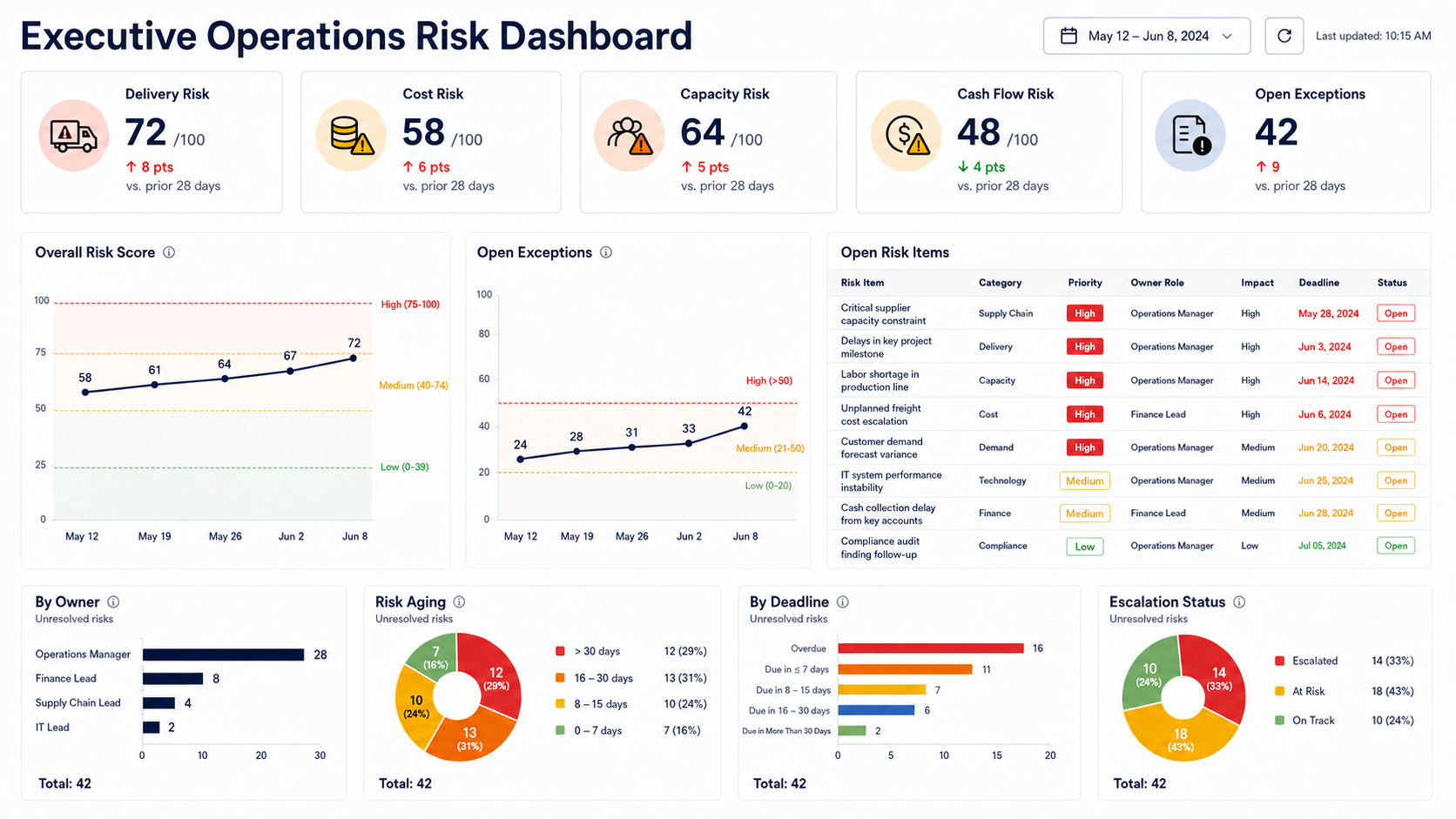
Operating risk rarely appears all at once. Before delivery slips, Production Schedule may already show a capacity gap or delayed critical tasks. Before equipment downtime, Resource Management may already show abnormal utilization, scrap, or maintenance risk. Before procurement cost rises, Supplier Price Tracking may show expired quote value or widening Price Spread %. Before cash flow tightens, Accounts Receivable may already show worsening aging and overdue value. If executives only look at final results, they can miss these early changes.
Local data matters because it is closer to real operating activity. An expired quote may look like a record update for procurement, but it may represent budget exposure for a project manager and margin distortion for leadership. A facility alert may look like a local issue for a field supervisor, but if it stays open, it can affect WIP, delivery rhythm, and customer commitments. Industry Software is not designed only to give each department another table. It helps translate local signals into a management language that executives can act on.
These calculations do not make the system more complicated. They make risk easier to judge, prioritize, and track. Industry Software can place these indicators into module views, role-based dashboards, and the executive risk queue so production, procurement, resource, finance, and field teams manage issues in their workflows while leadership sees cross-functional risk priorities.
An Executive Dashboard Should Answer Four Questions
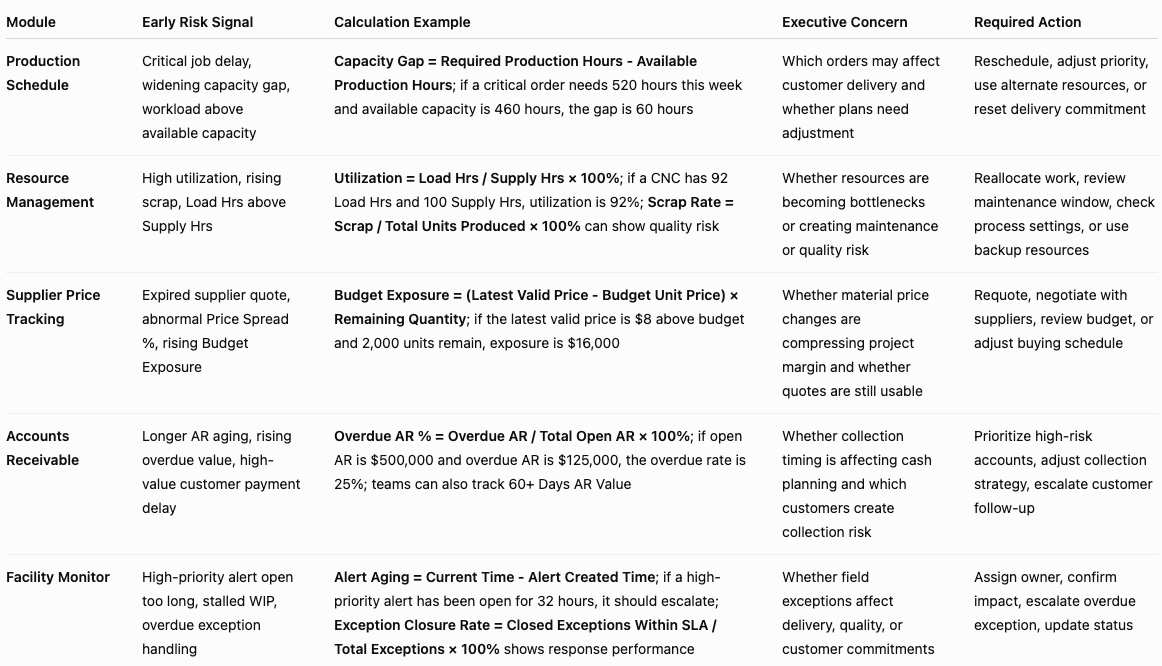
Many dashboards show numbers but do not answer the questions executives actually have. A red metric does not automatically tell the team what to do. A useful executive risk view should answer four questions: what changed, which business outcome is affected, who owns the response, and when escalation is required. Without those answers, visibility stops at seeing the exception rather than driving resolution.
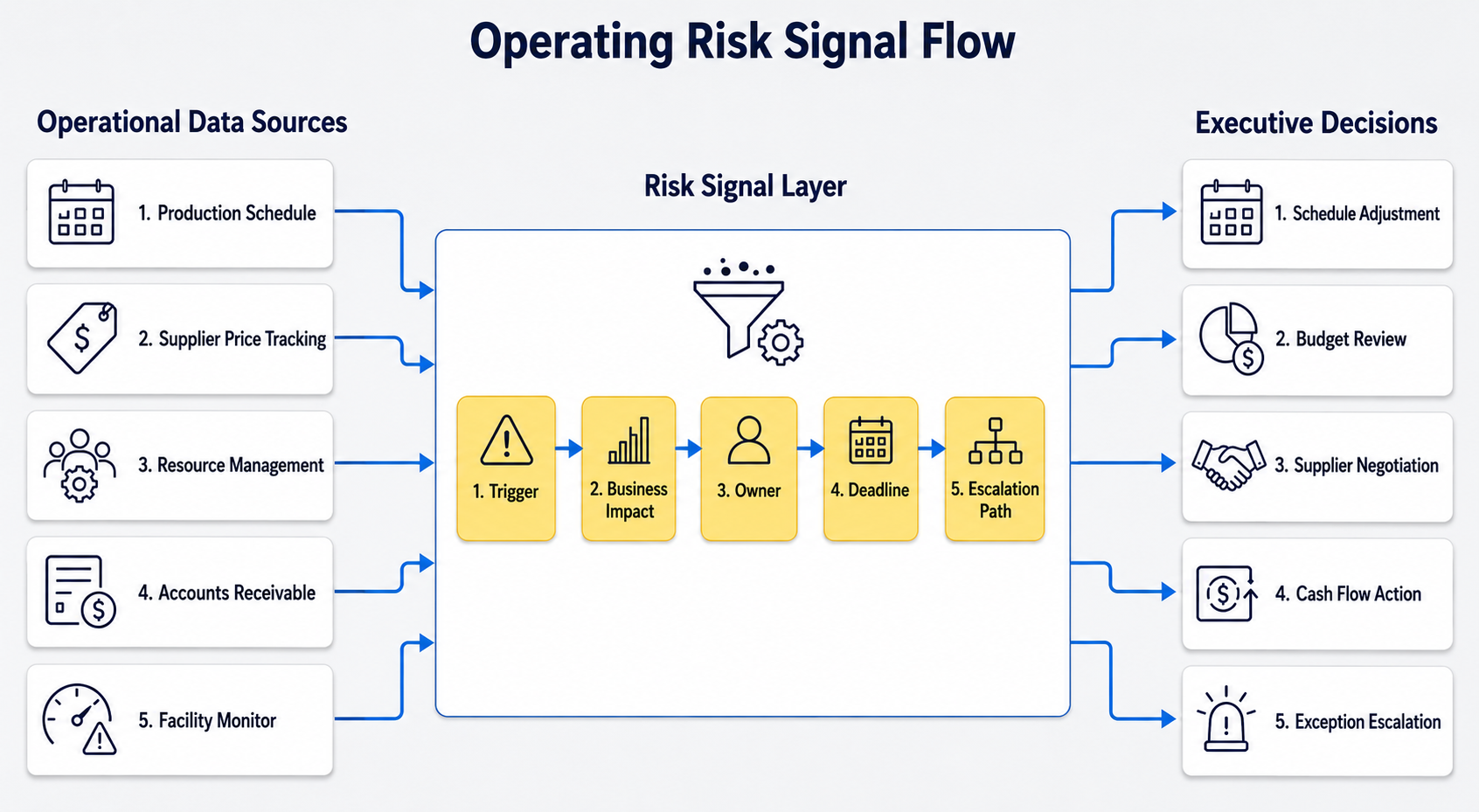
A risk signal can be defined through a simple logic: Risk Signal = Trigger + Business Impact + Owner + Deadline + Escalation Path. Trigger explains where the issue comes from, such as an expired quote, overloaded resource, overdue receivable, or unresolved alert. Business Impact explains whether it affects delivery, cost, margin, cash flow, or capacity. Owner shows who is responsible. Deadline sets the action window. Escalation Path defines what happens if the issue is not resolved on time. This structure is closer to executive decision-making than a KPI alone.
Industry Software can connect signals from different workflows into one operating view. Production teams continue working in Production Schedule, procurement teams manage quotes and validity in Supplier Price Tracking, finance teams track aging and payment status in Accounts Receivable, field teams handle alerts and WIP in Facility Monitor, and resource teams monitor utilization, capacity gaps, and scrap in Resource Management. Executives do not need to inspect every module in detail. They need to see which issues are crossing thresholds, which ones are already being handled, and which ones need escalation.
Risk Without Ownership Is Just a Better Screenshot
Visibility is often mistaken for the finish line. It is only the first step. A delayed job may be visible, but without an owner, progress does not automatically recover. An expired supplier quote may be highlighted, but without a deadline, a project budget may still use the old price. An overdue invoice may appear in an aging report, but without a follow-up path, cash flow risk does not automatically decrease. Executives need a risk closure loop, not only risk display.
A closure loop needs owner, deadline, and escalation. Owner makes the risk accountable, deadline gives the response a time boundary, and escalation prevents unresolved issues from staying at the same level. If a critical material quote expires and is not updated within 24 hours, it can escalate to the procurement manager and project manager. If a critical asset runs at high load for several days, it can notify the production supervisor and maintenance lead. If a high-value receivable stays overdue without customer response, it can escalate to the finance manager or account owner. Industry Software can configure these accountability paths through rules, role-based dashboards, and notification settings.
A mature closure loop can work this way:
Detect exceptions automatically: The system identifies overdue, overloaded, missing, abnormal, or unresolved items
Assign owners automatically: Different risks enter the right role’s work queue
Set response deadlines: High-impact risks get shorter deadlines; routine issues follow standard cycles
Track status: Risks move from open to in progress to closed
Trigger escalation: Overdue, repeated, or high-impact risks move into management view
Review risk trends: Executives see which risks repeat and which workflows need attention
Leading Indicators Are Better for Daily Management
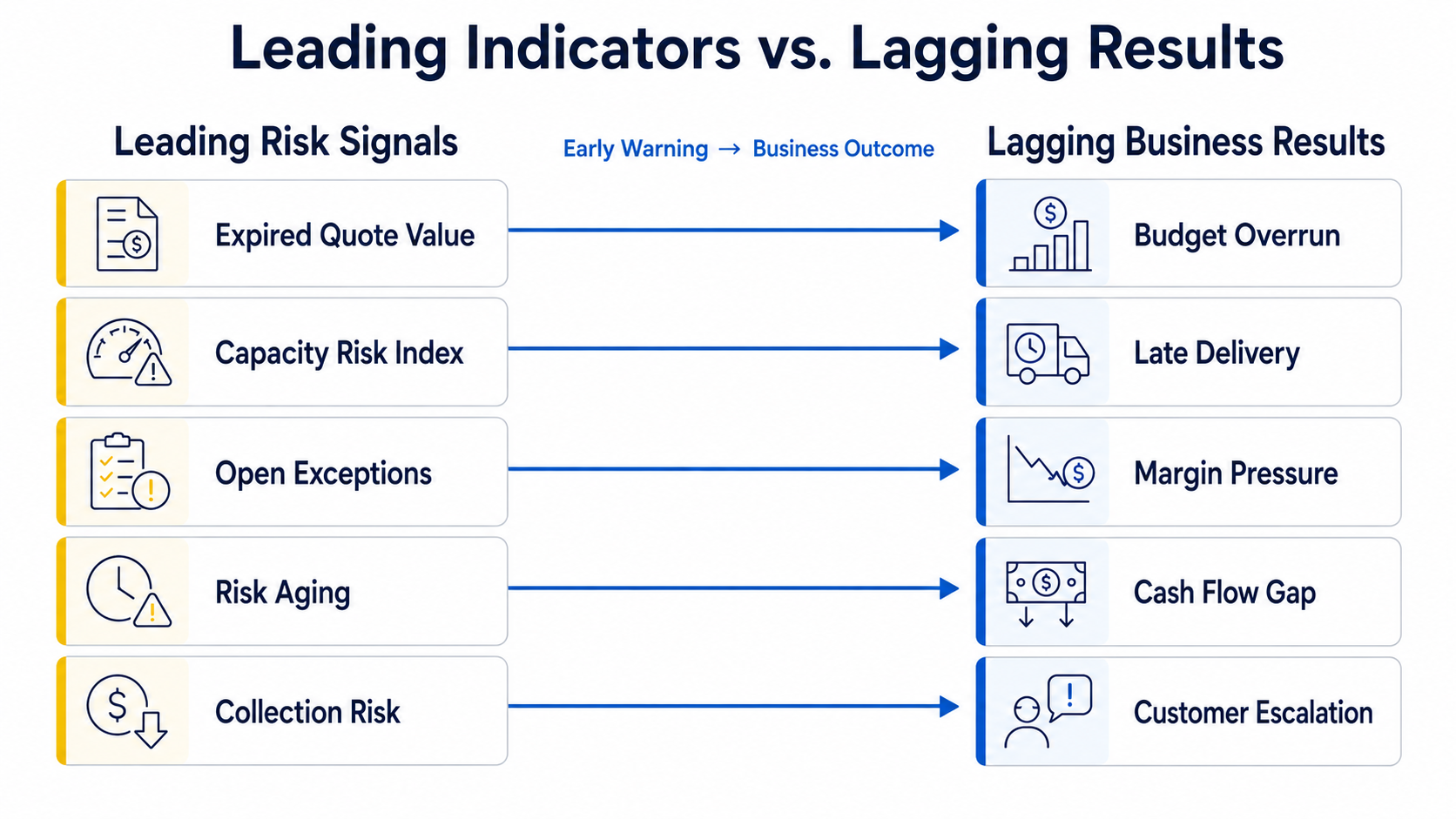
Executives still need final results such as revenue, margin, on-time delivery, and cash flow. But these are usually lagging indicators. They show how the business performed, but they do not always show where things are starting to weaken. Leading indicators are more useful for daily operating management because they point to risk before the final result appears. Overdue alerts, expired quote value, capacity risk, collection risk, and open exceptions by owner can help leadership act earlier.
Leading indicators should be designed around business consequences, not metrics for their own sake. Expired Quote Value is not about counting old quotes; it shows how much purchasing value may rely on unreliable pricing. Capacity Risk Index is not about whether resources look busy; it shows whether delivery plans may face bottlenecks. Collection Risk is not a list of receivables; it shows whether cash planning may be affected by customer payment delays. When indicators connect to outcomes, executives are more likely to use them.
Useful executive leading indicators include:
Open Risk Items by Owner: High-priority unresolved risks by accountable person
Risk Aging: Time from risk detection to resolution
Expired Quote Value: Expired pricing that may still affect purchasing decisions
Budget Exposure: Potential budget and margin pressure from cost changes
Capacity Risk Index: Combined signal from resource load, schedule conflict, and available capacity
Collection Risk: Cash pressure from AR aging, overdue value, and customer payment status
Exception Closure Rate: Percentage of exceptions closed within the required time window
Move from Monthly Review to Daily Exception Management in Industry Software
Many companies still rely heavily on monthly business reviews. Monthly review can explain what happened, but the cycle is often too slow for operating risk. Supplier quotes can expire within a week, field exceptions can affect delivery within a day, resource bottlenecks can change the production plan within several days, and collection risk can build before a payment deadline. If executives only see a summary at month end, it is difficult to adjust resources, budgets, or customer communication in time.
Industry Software supports a daily exception management model. Production teams can continue managing tasks and schedules in Production Schedule, procurement teams can maintain quotes and validity in Supplier Price Tracking, finance teams can review aging and collection status in Accounts Receivable, field teams can follow alerts and WIP in Facility Monitor, and resource teams can monitor utilization, capacity gaps, and scrap in Resource Management. The system’s value is not only that each team can see its own data. It is that high-impact, overdue, threshold-breaking, or cross-functional issues can be pushed into one risk view.
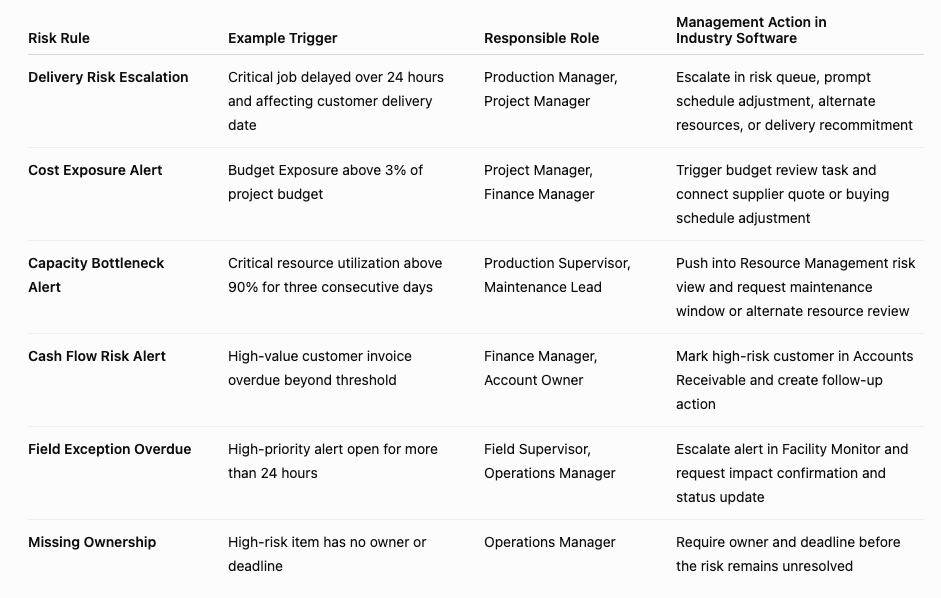
This means executives do not need to check every module every day or wait for every department to prepare a report. Industry Software can use role-based views, rules, alerts, and escalation settings to turn critical exceptions from different modules into Open Risk Items. Budget Exposure crossing a project threshold, a critical resource running above target load for three consecutive days, a high-value customer invoice entering serious overdue status, or a high-priority facility alert staying open for more than 24 hours can all enter the executive risk queue. Executives see a filtered risk list with owners and deadlines, not scattered operational data.
Start with the Industry Software Risks That Affect Business Results Most
Operating risk management should not begin by monitoring everything. Too many metrics, alerts, and responsibilities can cause teams to ignore the signals that matter most. During Industry Software rollout, it is better to start with four to six high-impact risks instead of placing every module and every field into the executive dashboard at once. For manufacturers, this may include resource bottlenecks, production delays, and quality exceptions. For project-based companies, it may include budget exposure, expired quotes, and procurement lead time. For engineering and service teams, it may include field exceptions, overdue jobs, and receivables risk.
This approach also fits modular deployment. A company can first validate whether a risk rule works inside one critical workflow, then expand it to more modules. For example, expired quote value and Budget Exposure from Supplier Price Tracking can enter the executive view first. Then utilization, capacity gaps, and scrap risk from Resource Management can be added. Later, collection risk from Accounts Receivable and overdue alerts from Facility Monitor can be included. Industry Software does not need to push all data to executives at once; it can help companies build an actionable risk management system by business impact.
Configuration can begin with practical questions. Which risks affect delivery, cost, margin, or cash flow? Can these risks be detected early from Industry Software module data? Which role should own each risk type? Should response deadlines be measured in hours, days, or review cycles? If the issue is overdue, should it escalate to a supervisor, project manager, finance manager, or executive? These answers become system fields, rules, dashboards, and notification paths.
A practical starting process can include:
Select high-impact scenarios: Start with the most important delivery, cost, capacity, and cash flow risks
Define triggers: Decide what counts as an exception, such as overdue status, threshold breach, missing fields, or negative trend
Clarify business impact: Connect each risk to budget, delivery, margin, resources, or cash flow
Assign role ownership: Every risk type must have an owner, not only a shared team mailbox
Set response deadlines: Match action windows to risk priority
Configure escalation paths: Escalate overdue or high-impact risks automatically
Review rule performance: Check whether alerts are too frequent, thresholds are realistic, and responsibilities are clear
A Four-Week Launch Path: Prove the Risk Loop Before Expanding Scope
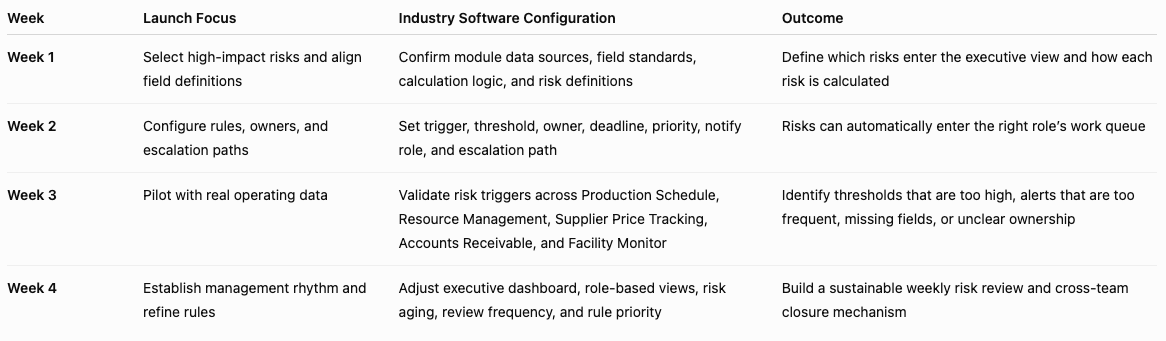
The executive risk view in Industry Software does not need to wait until every module is fully deployed. A more practical approach is to use four weeks to prove a small set of high-impact risks first. This allows the company to validate triggers, owners, deadlines, and escalation paths with real operating data. The goal is not to cover everything immediately. The goal is to build one working risk loop: the system detects the exception, the right person owns it, leadership can see status, and overdue issues escalate automatically.
Week one should focus on risk scope and field definitions. The company can choose four to six scenarios that most affect delivery, cost, capacity, or cash flow, such as critical job delay, capacity gap, expired quote value, Budget Exposure, overdue AR, and high-priority facility alerts. The Industry Software team can help confirm which fields each risk needs, including job due date, available hours, load hours, quote expiry date, latest valid price, budget unit price, invoice due date, and alert created time. Once field definitions are clear, rules and dashboards have a reliable foundation.
Week two should focus on rules and accountability paths. Each risk needs a trigger, threshold, owner, deadline, and escalation path. Budget Exposure above 3% of project budget can notify the project manager and finance manager. Critical resource utilization above 90% for three consecutive days can notify the production supervisor and maintenance lead. High-value AR overdue beyond the defined threshold can notify the finance manager and account owner. Industry Software can translate these management requirements into rules, alerts, priority labels, enable / disable switches, and role-based views.
Week three should use real data for a controlled pilot. Teams should not only use test data to see whether pages load. They should use real orders, quotes, resources, invoices, and field exceptions to check whether rules behave correctly. This week should test whether alerts are too frequent, thresholds are too low, owners are accurate, deadlines match the operating rhythm, and executive dashboards are clear enough. If a rule triggers dozens of times a day, it may become noise. If a high-impact risk never triggers, the threshold or field definition may need adjustment.
Week four should establish the management rhythm. Executives can begin reviewing the executive risk queue weekly, focusing on open risk items, risk aging, overdue exceptions, Budget Exposure, capacity risk, and collection risk. Department owners can work from their role-based dashboards to close assigned risks. The Industry Software team can help adjust dashboard fields, refine rule priorities, confirm escalation paths, and turn pilot learning into a repeatable management routine.
The value of a four-week launch path is that it shows how Industry Software turns risk management into daily work. It does not require every process to be covered at once. It first proves that critical risk can be detected earlier, assigned correctly, handled on time, and escalated when needed. This also helps the company identify data definition gaps, unclear ownership, and alert thresholds before the system expands. Once the risk loop works, adding more modules becomes more stable and more credible for both leadership and operating teams.
Rules Should Become Industry Software’s Management Engine, Not Alert Noise
Many companies introduce alerts and then face a new problem: there are too many notifications, so teams stop paying attention. The problem is usually not that rules are useless. It is that rules do not distinguish priority, business impact, and responsibility. A routine material quote expiring and a critical material quote expiring should not trigger the same level of alert. A low-value customer payment delay and a serious high-value receivable should not enter the same risk queue. Industry Software rules and alert settings should be configured around management judgment, not simply around whether the system can send a notification.
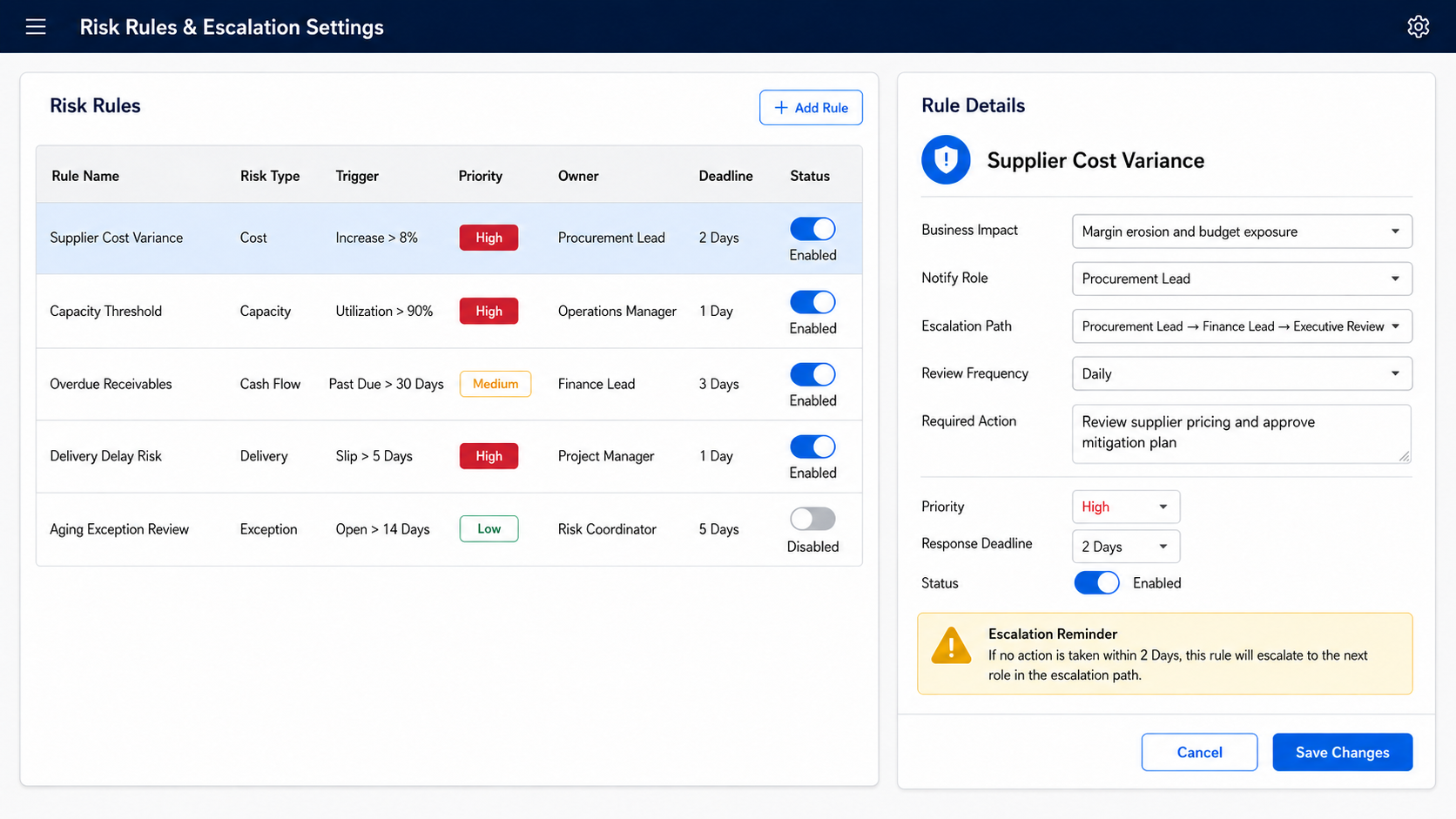
In Industry Software, an effective rule should include trigger, threshold, priority, owner, deadline, status, and escalation path. Critical resource utilization above 90% for three consecutive days can trigger capacity risk. Expired quote value above $50,000 can trigger cost risk. AR overdue amount above a customer threshold can trigger cash flow risk. Facility alert open for more than 24 hours can trigger execution risk. Enable/disable toggles, High / Medium / Low priority, review frequency, and notify role allow companies to adjust rules around their operating rhythm instead of being locked into fixed templates.
The value of Industry Software rules is not to replace management judgment. It is to bring issues that require judgment to the right role earlier. Production supervisors see capacity bottlenecks, procurement managers see quote risk, finance managers see collection risk, project managers see budget exposure, and executives see unresolved risks across workflows. Each role sees a risk queue connected to its responsibilities, not the same generic report. This is how rules become a management engine rather than alert noise.
Business Software Should Close Risk Loops Inside Industry Software
From an executive perspective, software value should not stop at data availability. The real question is whether data exposes risk early, whether risk has an owner, whether the owner responds on time, whether overdue risk escalates, and whether leadership can see patterns. Industry Software’s platform value is in organizing early signals across production, procurement, resources, field operations, and finance into clearer risk management paths. It does not simply add more reports; it lets exceptions from different modules follow one operating logic.
This changes how leadership and teams communicate. Executives do not only ask why delivery was late at month end; through Industry Software, they can see which orders are becoming delivery risks earlier. They do not only ask why budget was exceeded; they can see which supplier quotes, material prices, and Budget Exposure signals are pushing costs upward. They do not only ask why cash flow is tight; they can see which customers and invoices are creating collection risk. The earlier risk enters the right workflow inside the system, the less the business depends on firefighting.
Industry Software can also turn risk closure into a long-term management asset. The system can show which risks occur repeatedly, which owners often miss deadlines, which rules trigger too often, which thresholds need adjustment, and which processes may need redesign. As more modules go live, the risk view can expand from one workflow to cross-functional operations management. The software helps companies do more than see problems; it helps them build clearer data definitions, stronger accountability, and a more consistent operating rhythm.