Work Order Management in Field Service: From Scheduling to Service Reports

Summary
×A Completed Repair Is Not Always a Closed Work Order
A technician finishes a repair on Friday afternoon. The customer is satisfied, the equipment is running, and the technician moves to the next job. But the service report is not submitted until Tuesday, the parts used are mentioned in a message thread, the customer signature is stored as a photo, and the office team cannot close the job for billing. The service was completed, but the work order was not truly closed.
This delay can become expensive at scale. In a typical service operation, if 15% of completed work orders are closed late each month, service revenue may be pushed into the next financial cycle, warranty documentation may become harder to verify, and managers may lose visibility into technician productivity. The issue is not that the work was not done. The issue is that the work order did not carry the job cleanly from field execution to reporting and closure.
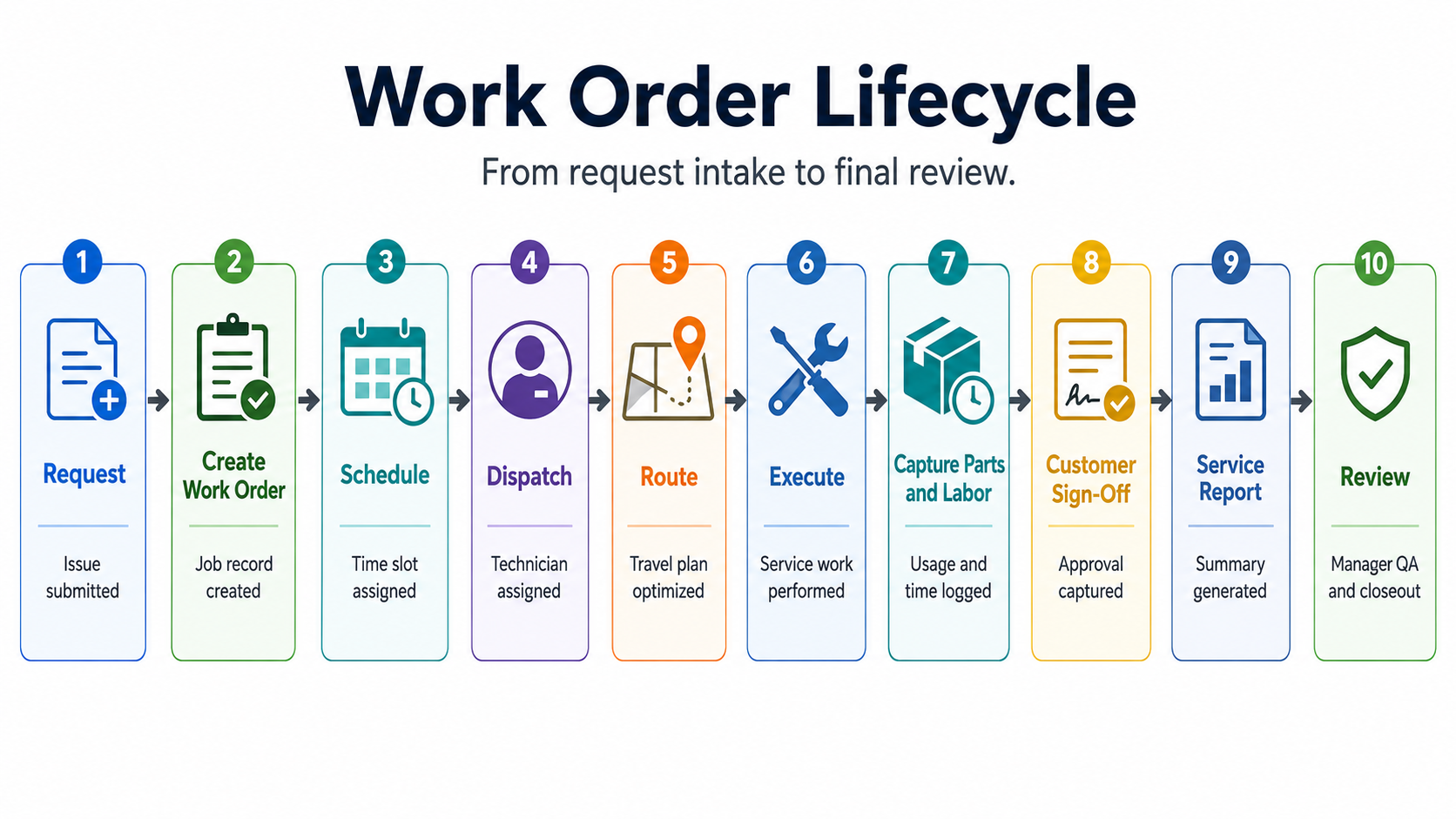
This is a common field service management problem. Many companies focus on getting technicians to the site, but the full work order lifecycle is longer than dispatch. It includes service intake, scheduling, routing, parts preparation, field execution, customer approval, reporting, billing support, and performance review. If any step stays outside the work order, the service process becomes difficult to control.
Service Intake Should Create Structured Work Orders
Field service delays often start at intake. A customer request may arrive through a phone call, email, portal form, website form, account manager, messaging app, or internal sales team. The channel should not determine the quality of the work order. A strong field service process converts every request into a consistent work order format, so dispatchers, technicians, inventory teams, and managers all work from the same service record.
A strong intake process captures the information needed to plan the job correctly. The system should record the customer, site, asset, issue type, urgency, SLA, preferred time window, access requirements, safety notes, warranty status, and related service history. This prevents dispatchers from assigning work without enough context.
Industry Software can help companies create standardized work order forms for different service types. An emergency repair work order can require priority and SLA fields, while an installation work order can require equipment details, site readiness, tools, and checklist steps. This makes the intake process more consistent without forcing every service request into the same format.
Scheduling Should Match the Work to the Right Technician
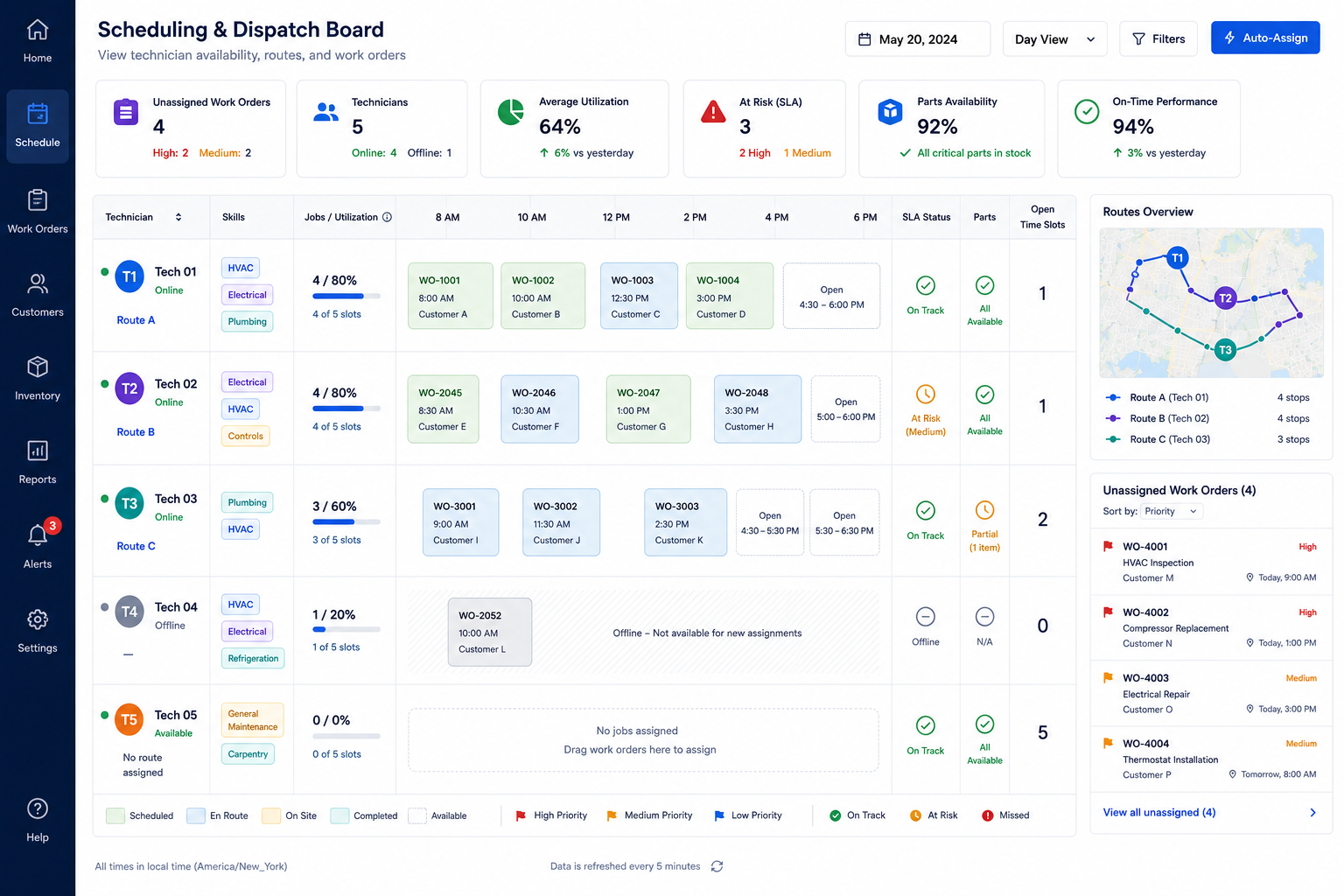
Scheduling is one of the highest-impact parts of work order management. A dispatcher needs to know who is available, who has the right skill, who is closest, who has the required certification, who already has a full day, and which work orders carry SLA risk. Without that visibility, scheduling becomes a manual negotiation.
A practical scheduling rule can combine several factors instead of relying on one condition: Dispatch Priority Score = SLA Risk + Skill Match + Travel Distance + Technician Workload + Parts Availability. This does not need to be a rigid mathematical formula for every company. The value is in making dispatch logic visible. If two technicians are available, the dispatcher should be able to compare who has the right skill, who is closer, who has capacity, who can meet the SLA, and who has access to the required part.
Industry Software can support dispatch boards that combine work order status, technician availability, route information, parts status, and SLA visibility. Dispatchers can move from “who can take this job?” to “who is the right person for this job, at the right time, with the right preparation?”
Route Tracking Should Support the Service Plan
Route tracking is not only about showing where a technician is. It helps dispatchers understand whether the service plan is realistic. If a technician is assigned three jobs across distant locations, the schedule may look full but not feasible. If a route changes because of traffic, emergency requests, or parts pickup, the work order plan should update as well.
For customers, route visibility reduces uncertainty. Customer service teams can provide more accurate arrival windows without repeatedly calling technicians. For managers, route data can reveal whether technicians are spending too much time traveling, returning to the warehouse, or waiting between jobs.
Industry Software can connect route tracking with work order status. Dispatchers can see when a technician is assigned, en route, arrived, working, delayed, waiting for parts, or completed. This makes route information part of service execution, not a separate map view.
Technicians Need Mobile Access to the Full Work Order
Technicians need more than a job address. They need the asset history, previous service notes, checklists, parts requirements, customer contact, safety instructions, and clear completion criteria. If that information is missing, the technician may need to call the office, guess based on experience, or delay the job until more details arrive.
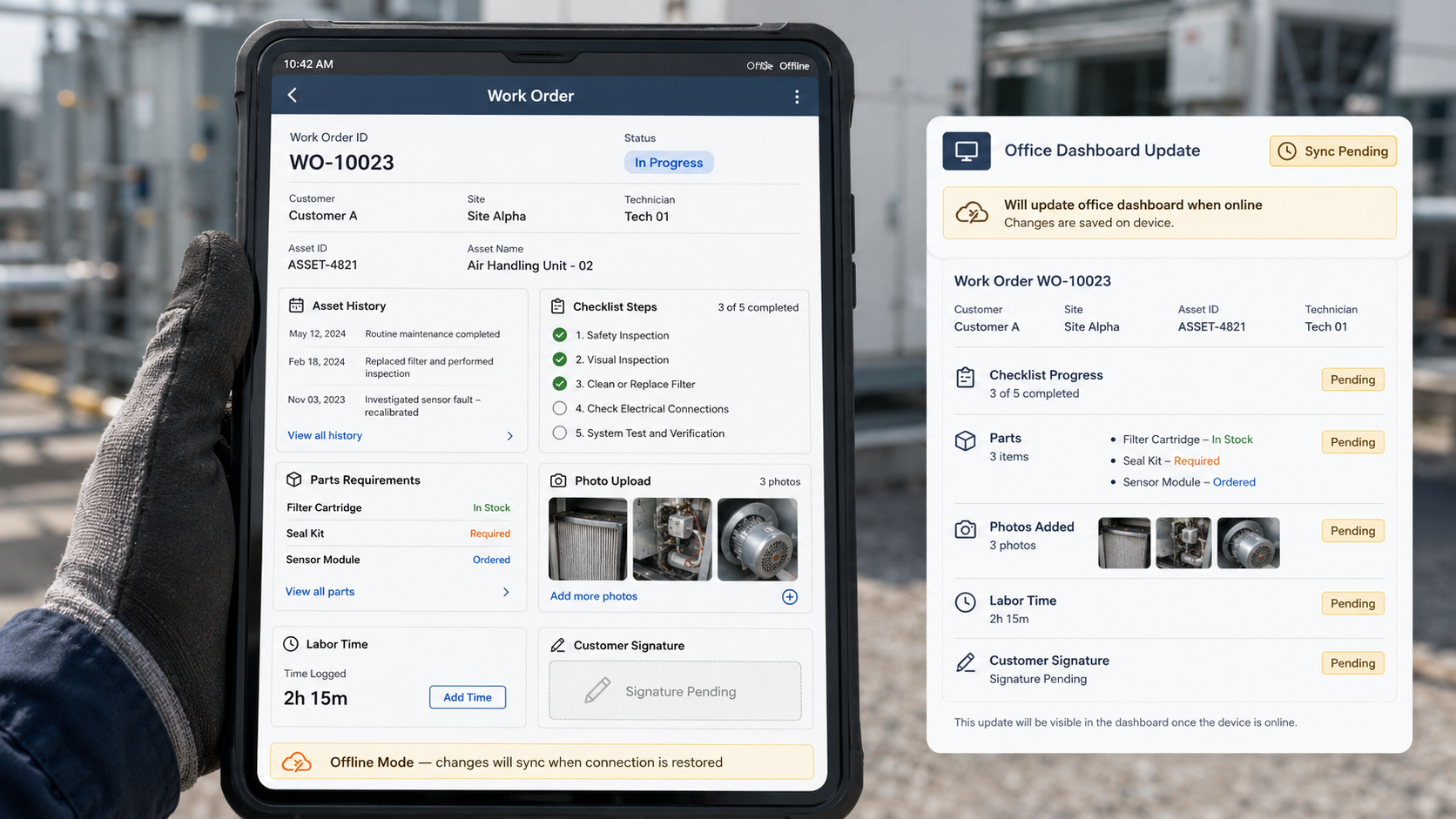
Mobile work orders help close the gap between the office and the field. A technician can review the task before arrival, follow checklists on site, upload photos, record labor time, add parts usage, capture customer notes, and update job status in real time. This creates a more accurate record of what actually happened.
Offline access is also important for field service teams. Technicians may work in equipment rooms, warehouses, industrial facilities, rural areas, or customer sites where the network is unstable. A practical mobile work order process should allow technicians to view job details, asset history, checklists, and parts requirements offline, then cache photos, labor time, notes, parts usage, and customer signatures until the device reconnects.
Parts and Labor Should Be Captured Before the Report Is Written
A service report is only as accurate as the data collected during the job. If technicians write reports later from memory, parts usage may be missed, labor time may be estimated, and customer notes may be incomplete. This creates problems for billing, warranty claims, inventory, and performance analysis.
A better process captures parts and labor inside the work order while the job is still active. When a technician uses a part, the work order should record the part, quantity, asset, and reason. When labor time is entered, it should be connected to the job type, technician, and customer. This creates a clean service record without duplicate data entry.
Parts usage should also connect back to inventory. When a technician records a replacement part in the work order, the system can deduct inventory from the correct warehouse, vehicle stock, or technician stock location. If stock drops below a configured threshold, a low-inventory alert can notify the inventory or procurement team. This connection helps companies avoid the common problem where parts are used in the field but inventory records are updated days later.
Service Closure Should Include Customer Confirmation
A work order should not be considered fully closed just because the technician left the site. The customer may need to confirm completion, review the service result, sign off on work performed, or approve follow-up recommendations. If this step happens outside the system, service closure becomes difficult to verify.
Customer confirmation also protects the service provider. Photos, notes, signatures, checklist results, and completion timestamps create a stronger record if there are later questions about what was done. This is especially useful for warranty work, equipment service, compliance inspections, and recurring maintenance contracts.
Industry Software can capture customer signatures, completion notes, photos, and service results within the work order. Once the work order is completed, the service report can be generated from the same data. This reduces manual rewriting and helps the office move more quickly from field completion to reporting, billing, or follow-up.
Service Reports Should Become Operational Data
Many companies treat service reports as documents for customers. They are that, but they can also be a source of operational insight. If reports are built from structured work order data, managers can see which service types take the longest, which assets generate repeat visits, which parts are frequently used, and which technicians need additional support or training.
Structured work order data can also generate field service KPIs. Managers can track first-time fix rate, mean time to repair, average response time, technician utilization, repeat failure rate, SLA compliance, parts consumption, and average work order closure time. These indicators are difficult to measure accurately when service reports are written manually after the job, but they become much easier when the report is generated from structured work order data.
Industry Software dashboards can help managers review open work orders, overdue jobs, repeat visits, first-time fix rate, technician utilization, parts usage, and service closure time. The service report then becomes more than a customer deliverable. It becomes part of the field service improvement cycle.
Quick Self-Check: Where Do Your Work Orders Slow Down?
A work order lifecycle is only as strong as its slowest step. If service requests arrive quickly but reports take days to close, the process is still incomplete. If technicians arrive on time but lack parts or asset history, dispatch is not fully effective. By connecting material tracking, maintenance histories, and administrative closures into a coordinated workflow, the platform helps field operations balance execution speed with data accuracy, guiding teams toward synchronized service delivery before back-office delays stall customer momentum.
A strong work order process should be able to answer:
Are new service requests from phone, email, portal, messaging apps, and internal teams converted into structured work orders?
Can dispatchers assign jobs based on skill, location, workload, parts availability, and SLA?
Can technicians access asset history, checklists, parts requirements, and customer notes on site?
Can technicians continue working offline and sync updates when they reconnect?
Are parts usage, labor hours, photos, and customer signatures captured in the same work order?
Does parts usage automatically update inventory or trigger low-stock alerts?
Are service reports generated from field data instead of rewritten manually?
Can managers review KPIs such as first-time fix rate, mean time to repair, technician utilization, repeat visits, and work order closure time?
If several answers are unclear, the issue may not be technician effort. It may be work order lifecycle visibility. Better field service management starts when every step from request to report is connected. By linking field activity directly with back-office tracking, the platform removes informational gaps across the service journey, guiding operational leaders toward systemic improvements before structural bottlenecks lower team productivity.
How Industry Software Supports Work Order Lifecycle Management
Industry Software helps companies manage the full work order lifecycle, from service intake and scheduling to mobile execution, customer confirmation, reporting, and performance review. The system can be configured around different service types, approval requirements, field checklists, technician roles, SLA rules, customer communication needs, and inventory workflows.
Companies can start with work order creation, dispatch scheduling, mobile technician workflows, service reports, or dashboards, then expand into route tracking, inventory visibility, customer confirmation, and KPI management. This modular approach helps service teams improve step by step rather than replacing every process at once.
Cloud-based access makes the process more practical for distributed service teams. Dispatchers, technicians, inventory teams, customer service staff, and managers can work from the same service record. The work order becomes the shared source of truth from the first customer request to the final service report.