Why Field Service Teams Need Work Order Visibility Before Hiring More Technicians

Summary
×A Bigger Team Will Not Fix an Invisible Workflow
When service backlogs grow, many companies assume they need more technicians. That may be true in some cases, but it is not always the first problem to solve. If managers cannot see which work orders are waiting for dispatch, which are waiting for parts, which are stuck with customer approval, and which are repeat visits, adding more people may only spread the same confusion across a larger team.
A field service operation can feel understaffed even when the real issue is work order visibility. Technicians may be spending too much time driving, waiting for parts, returning to sites, or clarifying incomplete job details. Dispatchers may be assigning work based on urgency rather than skill, route, or SLA. Managers may see a backlog number without knowing where the work is actually stuck. Before hiring more technicians, service leaders should ask a harder question: do we know where every work order is right now? If the answer is unclear, the team may not need more headcount first. It may need a clearer operating view.
Backlog Is Not One Problem
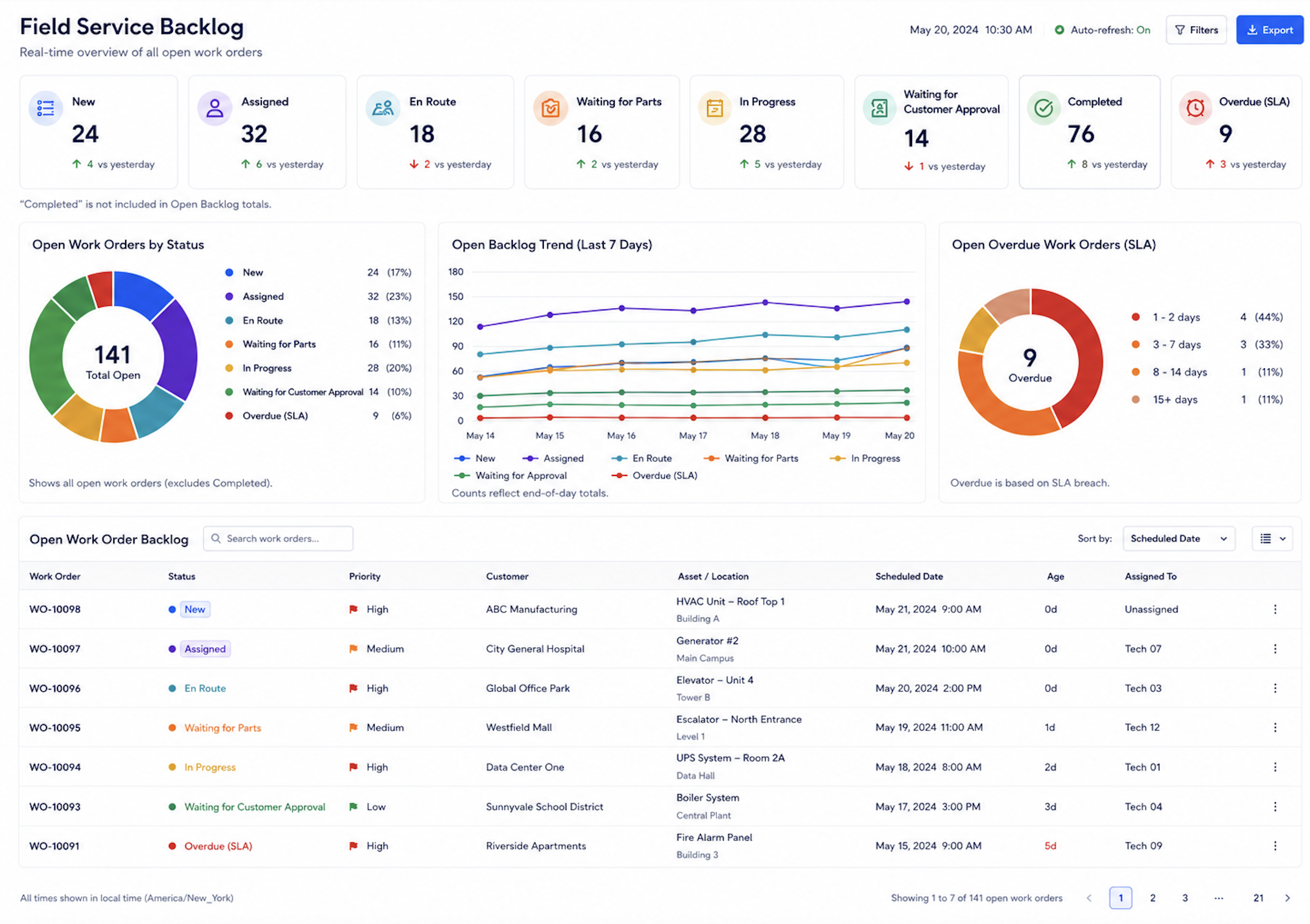
A backlog number can hide several different problems. Fifty open work orders may sound like a staffing issue, but the reason behind those fifty jobs matters. Some may be waiting for dispatch, some may be waiting for parts, some may be waiting for customer access, and some may be repeat visits caused by incomplete first visits.
If all open work orders are treated the same, managers may make the wrong decision. Hiring more technicians will not solve a parts shortage. Adding another dispatcher will not fix missing asset history. Extending work hours will not reduce repeat visits if technicians are being sent without the right tools or information.
Work order visibility helps separate backlog into manageable categories:
Work orders not yet assigned
Work orders assigned but not started
Jobs delayed by route or travel time
Jobs waiting for parts
Jobs waiting for customer access or approval
Jobs requiring follow-up visits
Completed jobs waiting for reports or closure
Technician Utilization Can Be Misleading
A technician’s schedule may look full, but that does not mean the technician’s time is being used well. A full calendar can include long travel routes, repeated warehouse stops, unclear job requirements, waiting time, or return visits. Without work order-level visibility, managers may mistake activity for productivity.
Field service productivity depends on how much technician time is spent completing valuable work, not just how many jobs are assigned. If a technician spends half the day traveling between poorly grouped sites, adding another technician may reduce pressure temporarily but does not solve the scheduling problem. If technicians frequently arrive without the right parts, the issue is not technician capacity; it is work order preparation.
Industry Software can help managers view technician workload together with route time, job status, SLA risk, and work order type. This gives a more realistic view of capacity. A technician with fewer jobs may still be fully occupied if travel time is high, while another technician may be available for urgent work if location and skill match the request.
Work Order Status Shows Where Action Is Needed
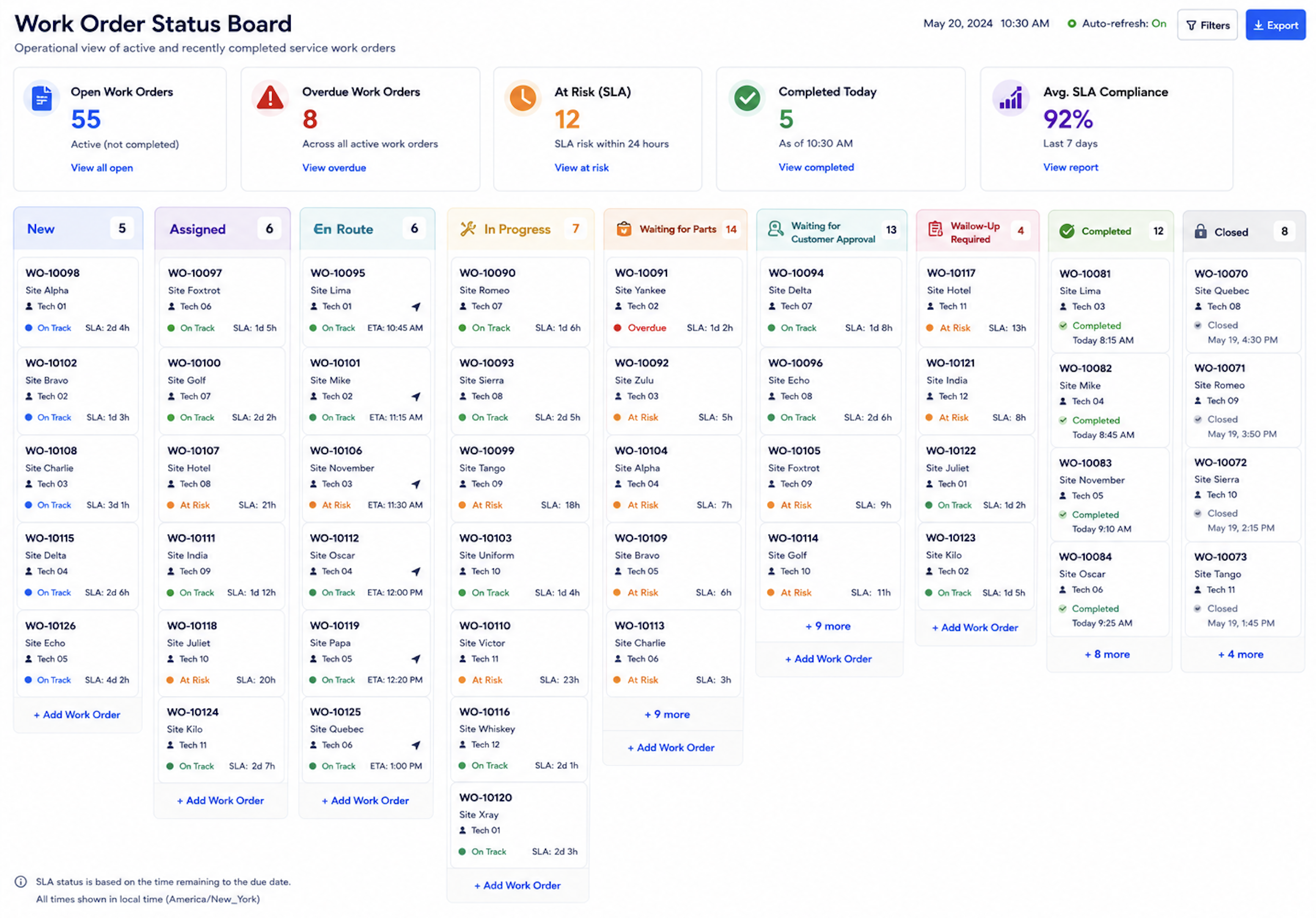
Status visibility is one of the most important parts of field service management. A work order should not simply be open or closed. It should move through statuses that show what is happening and what action is needed next. Without clear statuses, dispatchers and managers need to ask for updates manually.
A more useful work order status model might include New, Assigned, En Route, Arrived, In Progress, Waiting for Parts, Waiting for Customer Approval, Follow-Up Required, Completed, and Closed. Each status tells the organization something different. A job waiting for parts needs inventory action. A job waiting for customer approval needs communication. A job repeatedly moving to follow-up may signal training, parts, or asset history issues.
Industry Software can support configurable work order statuses and status-based dashboards. Teams can define statuses that match their service process instead of forcing every job into a generic open or closed category. Managers can then see not only how many work orders exist, but what kind of action each one requires.
Route Visibility Reduces Hidden Capacity Loss
Travel time is one of the easiest field service costs to underestimate. A technician may complete fewer jobs not because they work slowly, but because the route is poorly planned. Emergency jobs, parts pickups, customer availability, and regional distance can all reduce effective working time.
Without route visibility, managers may only see that jobs are delayed. They may not see that technicians are crossing the same area multiple times, returning to the warehouse too often, or losing time between distant appointments. The organization may then add technicians when the real opportunity is better dispatch sequencing.
Industry Software can connect work orders with route tracking and technician location. Dispatchers can group jobs by area, see who is closest, and adjust assignments when urgent requests appear. Managers can also review route history to understand whether backlog pressure comes from demand volume, poor routing, missing parts, or service complexity.
Repeat Visits Often Reveal Process Problems
Repeat visits are one of the clearest signals that work order visibility is weak. A technician may complete the first visit but need to return because the correct part was not available, the asset history was incomplete, the issue was misdiagnosed, or the customer approved additional work only after the visit. Each repeat visit adds travel time, labor time, customer frustration, and scheduling pressure.
If repeat visits are not tracked by work order, customer, asset, technician, and failure type, managers may not see the pattern. The same equipment may generate repeated service calls. The same part may be missing from multiple jobs. The same service type may require better checklists or pre-visit preparation.
Industry Software can help teams connect repeat visits to asset history, parts usage, technician notes, and service outcomes. This allows managers to identify whether the problem is technical, procedural, inventory-related, or customer-related. Before hiring more technicians, companies should first understand how much existing capacity is being consumed by avoidable repeat visits.
Mobile Updates Keep Managers From Operating Blind
Field service changes throughout the day. A technician may need a part, a customer may cancel access, a job may take longer than expected, or a new emergency request may appear. If updates are delayed until the end of the day, managers operate with stale information.
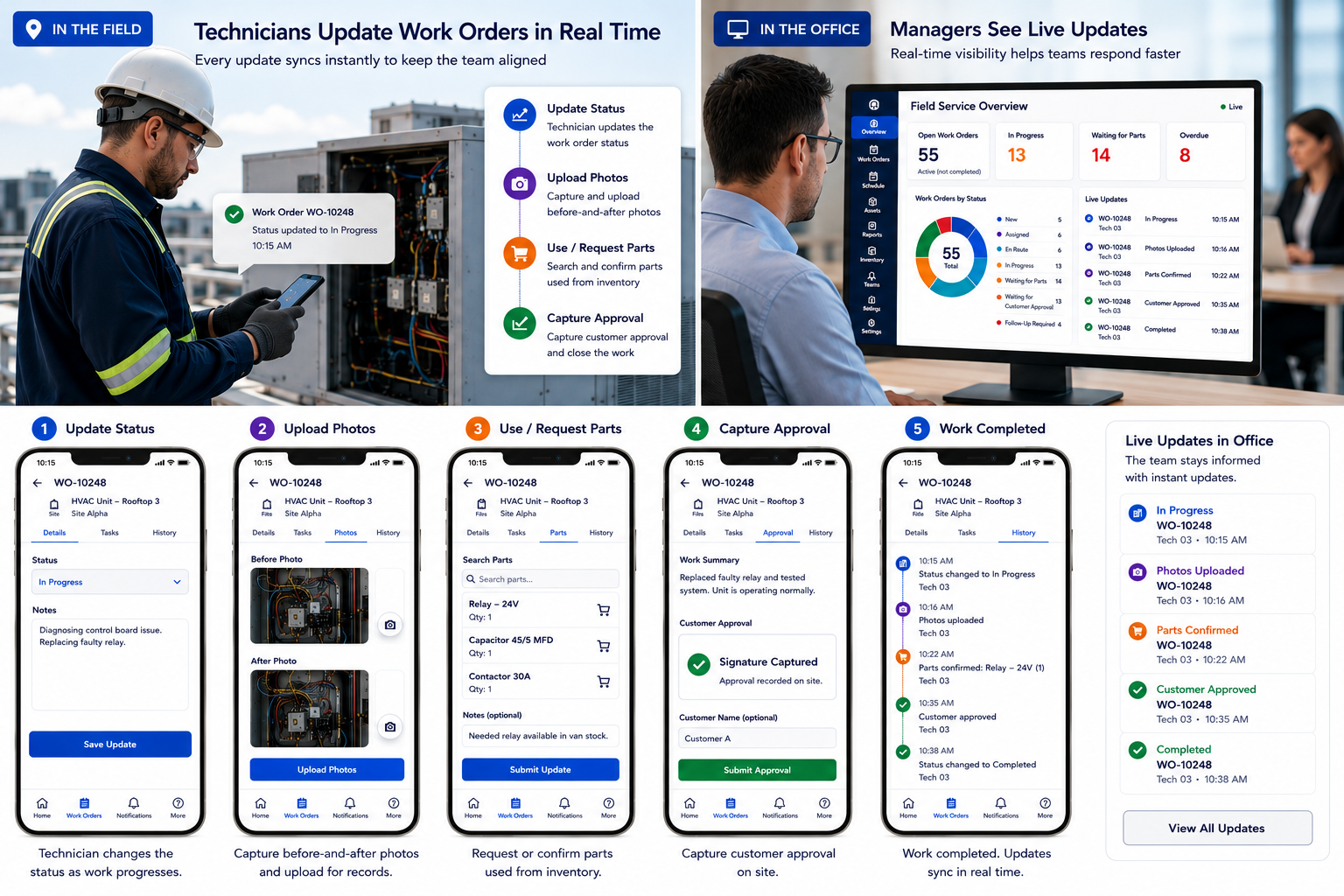
Mobile work order updates help the office see what is happening in the field. Technicians can update status, upload photos, record parts usage, submit labor time, capture customer approval, and request follow-up from the jobsite. This reduces the need for dispatchers to call technicians repeatedly and gives managers a clearer view of service progress. Industry Software’s cloud-based mobile workflows help keep work order data current. When a job moves to waiting for parts, customer approval, or follow-up required, the status becomes visible immediately. The value is not only faster reporting; it is faster intervention.
Dashboards Should Show Bottlenecks, Not Just Volume
A dashboard that only shows the number of open work orders does not tell managers enough. Service leaders need to understand the reason behind the backlog. They should see which jobs are waiting for dispatch, which are close to SLA breach, which technicians are overloaded, which regions have route pressure, which parts are blocking work, and which customers or assets create repeat visits.
A stronger dashboard helps managers decide what to do next. If most delayed jobs are waiting for parts, the priority is inventory and procurement. If jobs are delayed because of route time, dispatch sequencing should be reviewed. If repeat visits are rising, training, checklists, or asset history may need attention.
Industry Software dashboards can show work order backlog, SLA risk, technician utilization, route time, waiting-for-parts jobs, repeat visits, first-time fix rate, overdue work orders, and average closure time. This gives leadership a more useful view than simply seeing whether the team is busy.
Quick Self-Check: Can You See Where Every Work Order Is Stuck?
Before hiring more technicians, service leaders can ask a few practical questions. If several answers are unclear, the team may not have a staffing problem first. It may have a visibility problem. By evaluating operational patterns before adding headcount, the platform helps managers expose latent scheduling friction, guiding the service organization toward capacity optimization before expanding the fixed payroll.
A mature field service operation should be able to answer:
Can you see every open work order by status?
Do you know which jobs are waiting for dispatch, parts, customer approval, or technician completion?
Can you identify repeat visits for the same asset or customer?
Can you see technician workload and route time before adding more staff?
Do you know which service types take the longest to close?
Can managers track backlog, SLA risk, first-time fix rate, overdue work orders, and average closure time in one dashboard?
Can technicians update work order status from the field in real time?
If the answer to several of these questions is “no,” hiring may still be needed later, but it should not be the first move. Better visibility can often reveal where existing capacity is being lost. By clarifying the bottlenecks in current operations, the platform highlights the exact friction points in the technician schedule, guiding field service leaders toward efficiency gains before committing to long-term resource expansions.
How Industry Software Improves Work Order Visibility
Industry Software helps field service teams see work orders by status, technician, route, customer, asset, parts requirement, SLA risk, and completion stage. Instead of managing work through scattered calls, spreadsheets, and message threads, teams can work from one shared operational view.
The system can be configured around each company’s service model. Equipment repair, installation, inspection, preventive maintenance, warranty support, and multi-site service can each use different work order fields, statuses, checklists, and approval rules. Companies can start with work order visibility, dispatch boards, route tracking, mobile updates, or dashboards, then expand as their field service maturity grows.
Cloud-based access keeps office teams and field technicians aligned throughout the day. Managers can see where work is stuck, dispatchers can adjust assignments, technicians can update jobs from the field, and leadership can understand whether backlog pressure comes from staffing, routing, parts, repeat visits, or service process design.