Manufacturing Work Order Management: How to Connect Production Planning, Inventory, and Shop Floor Execution

Summary
×A Work Order Can Be Released and Still Not Be Ready
A production planner releases a work order for 500 units because the customer delivery date is approaching. The machine is available, the operator team is scheduled, and the production plan looks clear on paper. But when the shop floor prepares to start, one material is short, the latest routing change was not reflected, and the quality checklist has not been updated for the new customer requirement. The work order exists, but the production process is not truly ready.
This is a common problem in manufacturing operations. Many companies create production work orders, but those work orders do not always connect planning, inventory, routing, capacity, quality, and execution data. As a result, the shop floor may receive instructions that look complete but still require manual checking, side conversations, and last-minute correction.
A manufacturing work order should be more than a production instruction. It should be the operational record that connects what needs to be made, which materials are required, which routing steps should be followed, which equipment and labor are needed, what quality checks must happen, and how completion will be recorded. When this connection is missing, production teams may stay busy while the operation still loses time, material, and delivery confidence.
Work Orders Should Carry the Production Plan Into Execution
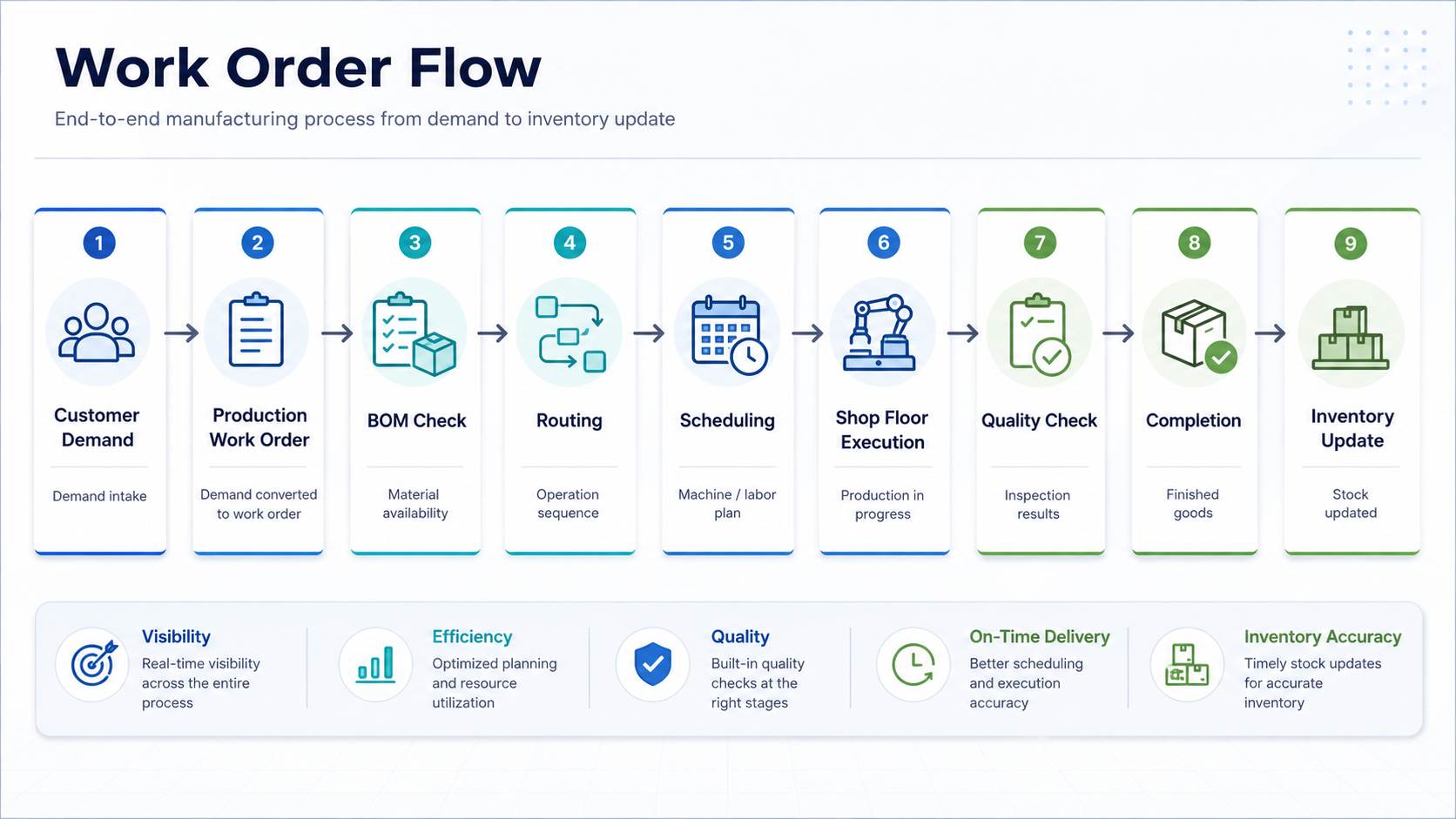
Production planning often starts with demand: a customer order, forecast, replenishment requirement, or internal production target. The work order translates that demand into executable production. It should show the product, quantity, due date, required materials, routing steps, work centers, labor requirements, quality checkpoints, and completion rules.
The problem is that many manufacturers still treat the work order as a static instruction. Planning may create it, but inventory, production, quality, and warehouse teams may each maintain related information separately. When the work order does not carry those connections, execution depends on people manually checking whether materials are available, whether routing is current, and whether the line is ready.
A stronger manufacturing work order should include:
Product and quantity
Customer order or demand source
BOM and required materials
Routing and work center steps
Machine, labor, and shift requirements
Planned start and finish time
Quality checkpoints and inspection forms
Scrap, rework, and completion rules
Finished goods and inventory update logic
Industry Software can support configurable manufacturing work order templates for different production models, such as make-to-order, make-to-stock, batch production, assembly, packaging, or repair production. This matters because each production type needs different information. A batch production work order may require lot control and material traceability, while an assembly work order may need component availability, routing steps, and quality sign-off.
Material Readiness Should Be Checked Before Release
One of the most common reasons production slows down is material mismatch. A work order may be released, but one component is short, a substitute material has not been approved, or the correct batch has not been moved to the line. The schedule says production can start, but the shop floor cannot execute without the right materials at the right time.
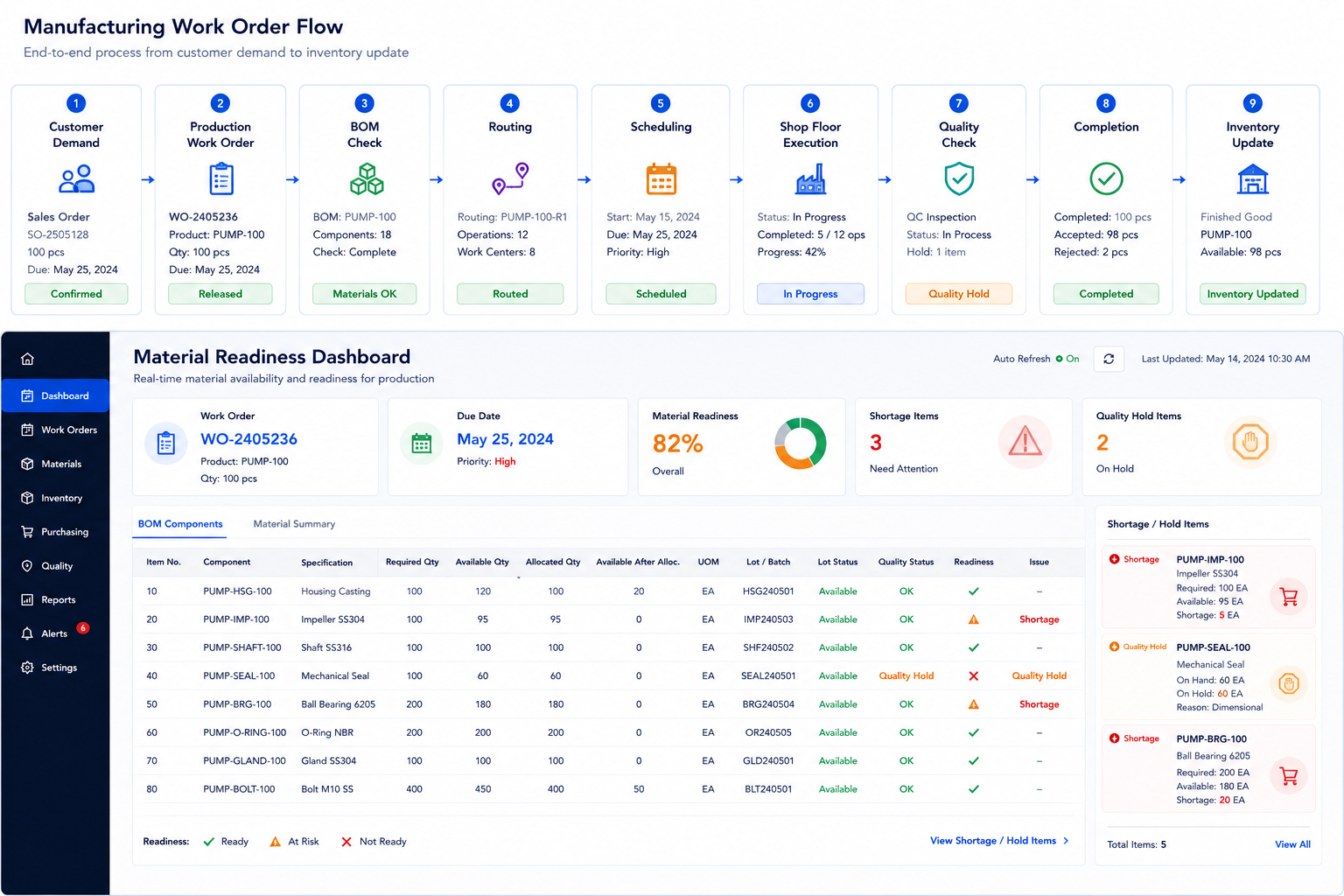
Material readiness is not only about total inventory quantity. The system needs to know whether the required material is available in the correct warehouse, whether it is allocated to another order, whether the lot is approved for use, whether the shelf life is valid, and whether quality hold applies. Without that visibility, planners may release work orders that look feasible but create waiting time on the floor.
A practical readiness check should answer:
Are all BOM materials available?
Are required quantities allocated to the correct work order?
Are lots or batches approved for production?
Are substitute materials approved and documented?
Are materials available at the right location?
Are any components under quality hold?
Will material shortages affect the production schedule?
Industry Software can connect production work orders with inventory availability, BOM requirements, lot status, material allocation, and shortage alerts. If a key component is missing or blocked, the system can flag the work order before it reaches the shop floor. This helps planners avoid releasing work that cannot realistically start.
Routing and Capacity Should Shape the Schedule
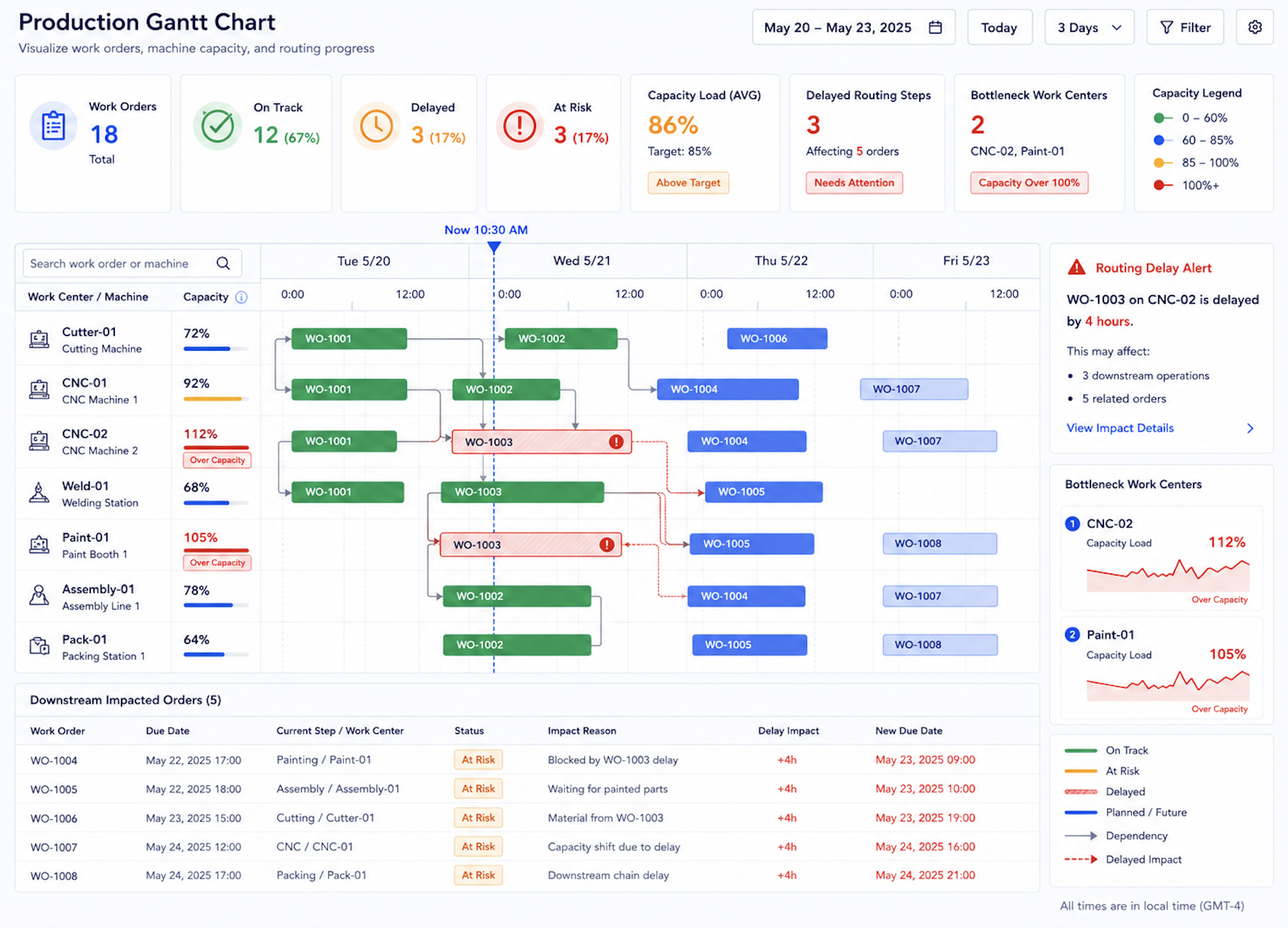
A production work order is only executable if routing and capacity are realistic. The work order may define the correct product and materials, but if the required work center is overloaded, the machine is under maintenance, or the routing step was changed without updating the schedule, the plan will break during execution.
Manufacturing teams need to connect work orders with routing, machine capacity, labor availability, and shift schedules. A routing change may add an inspection step, require a different machine, or extend cycle time. A capacity constraint may force planners to resequence jobs or split production across shifts. If these changes do not update the work order schedule, delivery risk increases.
Industry Software can help planners connect production work orders with Gantt scheduling, work center capacity, machine availability, labor planning, and routing steps. When a bottleneck appears, planners can see which work orders are affected and adjust sequencing before the shop floor feels the impact. The goal is not only to create a schedule, but to create a schedule that reflects real production constraints.
Shop Floor Feedback Should Update the Work Order in Real Time
Once production starts, the shop floor generates important information every hour. Operators may report start time, completed quantity, scrap, downtime, machine issues, material consumption, rework, or quality problems. If this information stays on paper forms or gets entered at the end of the shift, planners and managers see production status too late.
A modern work order process should allow the shop floor to report progress directly against the work order. Operators can record production quantities, scrap reasons, downtime codes, material usage, and issue notes from a terminal, tablet, or mobile device. This creates a more accurate view of what is happening and helps supervisors respond before delays grow.
Industry Software can support shop floor reporting linked to each production work order. When production falls behind, material usage exceeds standard, or scrap rises above threshold, the system can update the work order status and trigger alerts. This helps teams move from end-of-day reporting to active production control.
Quality Checks Should Be Embedded in the Work Order
Quality should not sit outside production execution. If quality checks are recorded separately from the work order, manufacturers may struggle to understand which batch, operator, machine, material lot, or routing step caused a defect. Quality becomes harder to trace, and rework becomes harder to control.
A better work order includes quality checkpoints at the right steps. First-piece inspection, in-process inspection, final inspection, measurement results, defect records, and approval status should all connect to the production work order. If an inspection fails, the system should show whether the work order can continue, should be held, or needs rework.
Industry Software can embed quality checklists, inspection forms, defect records, and quality hold status into the work order flow. This helps production and quality teams work from the same record. The work order no longer only asks “Was the quantity completed?” It also asks “Was it completed correctly?”
Completion Should Update Inventory and Performance Data
A work order is not fully complete when the last unit leaves the line. Completion should update finished goods inventory, material consumption, scrap, labor, machine time, quality results, and production performance data. If these updates are delayed or handled manually, inventory and planning accuracy suffer.
When a work order closes, the system should record produced quantity, accepted quantity, rejected quantity, rework quantity, consumed materials, and final status. It should also update inventory so warehouse and planning teams know what is available for shipping or future production. This connection reduces the gap between what the shop floor made and what the business system believes is available.
Industry Software can connect work order completion with inventory updates, quality results, production dashboards, and historical performance records. Over time, this data helps manufacturers understand cycle time, scrap rate, work center performance, material usage variance, and schedule adherence. The work order becomes a source of operational learning, not just a production task.
Quick Self-Check: Is Your Production Work Order Ready for Execution?
A production work order should help planning, inventory, production, quality, and warehouse teams work from the same operational record. If the work order only shows product and quantity, it may not be enough to support reliable execution. By enriching the work order with real-time process dependencies, material routing, and quality criteria, the system transforms a flat document into a dynamic source of truth, ensuring that cross-functional handoffs are executed with absolute precision and zero misalignment.
A strong manufacturing work order process should be able to answer:
Does each work order connect to the correct BOM and routing?
Are material availability, lot status, and shortages visible before release?
Are machine capacity, labor availability, and shift schedules connected to the work order?
Can operators report progress, scrap, downtime, and material usage from the shop floor?
Are quality checks embedded in the work order flow?
Can the system hold a work order when quality or material issues appear?
Does completion update finished goods inventory automatically?
Can managers see work order status, bottlenecks, scrap, and schedule risk in one dashboard?
If several answers are unclear, the issue may not be planning effort. It may be work order connectivity. Better manufacturing execution starts when the production work order becomes the shared record between planning and the shop floor. By anchoring the entire shift's activities to this single digital thread, the platform closes the gap between strategy and execution, transforming the work order from a static instruction into a live instrument of operational alignment.
How Industry Software Supports Manufacturing Work Order Management
Industry Software helps manufacturers connect production planning, BOM, routing, inventory, shop floor execution, quality checks, and completion data in one configurable system. The platform can be tailored around different production models, including assembly, batch production, make-to-order, make-to-stock, repair production, and multi-line manufacturing.
Manufacturers can start with production work orders, material readiness checks, shop floor reporting, quality forms, inventory updates, or dashboards, then expand toward a broader manufacturing execution workflow. This modular approach helps teams improve operations step by step without forcing a full process replacement at once.
Cloud-based access and configurable workflows help office teams and shop floor users work from the same production record. Planners can see readiness, supervisors can see execution, operators can report progress, quality teams can record inspections, and managers can review performance from one system. Industry Software helps turn the manufacturing work order from a production instruction into a connected execution process.