ERP Implementation Strategy: Turning ERP into an Operating Structure

Summary
×Implementation Fails When Go-Live Becomes the Finish Line
Many ERP projects appear successful on launch day but still fail in daily operations. Data is migrated, users can log in, and transactions can be entered, but real decisions still happen through spreadsheets, email approvals, chat messages, and manager follow-ups. The system is live, but the business is still not running through one controlled structure.
A project-based company may enter purchase orders in ERP, while over-budget approvals still happen outside the system. A manufacturer may move item data and BOMs into ERP, while production teams still confirm material readiness manually. A distributor may have stock records in ERP, while sales still checks availability with warehouse staff before promising delivery. The sharper implementation question is: which decisions must ERP control before work can move forward? If the answer is unclear, the project is not an ERP implementation strategy. It is only a software rollout.
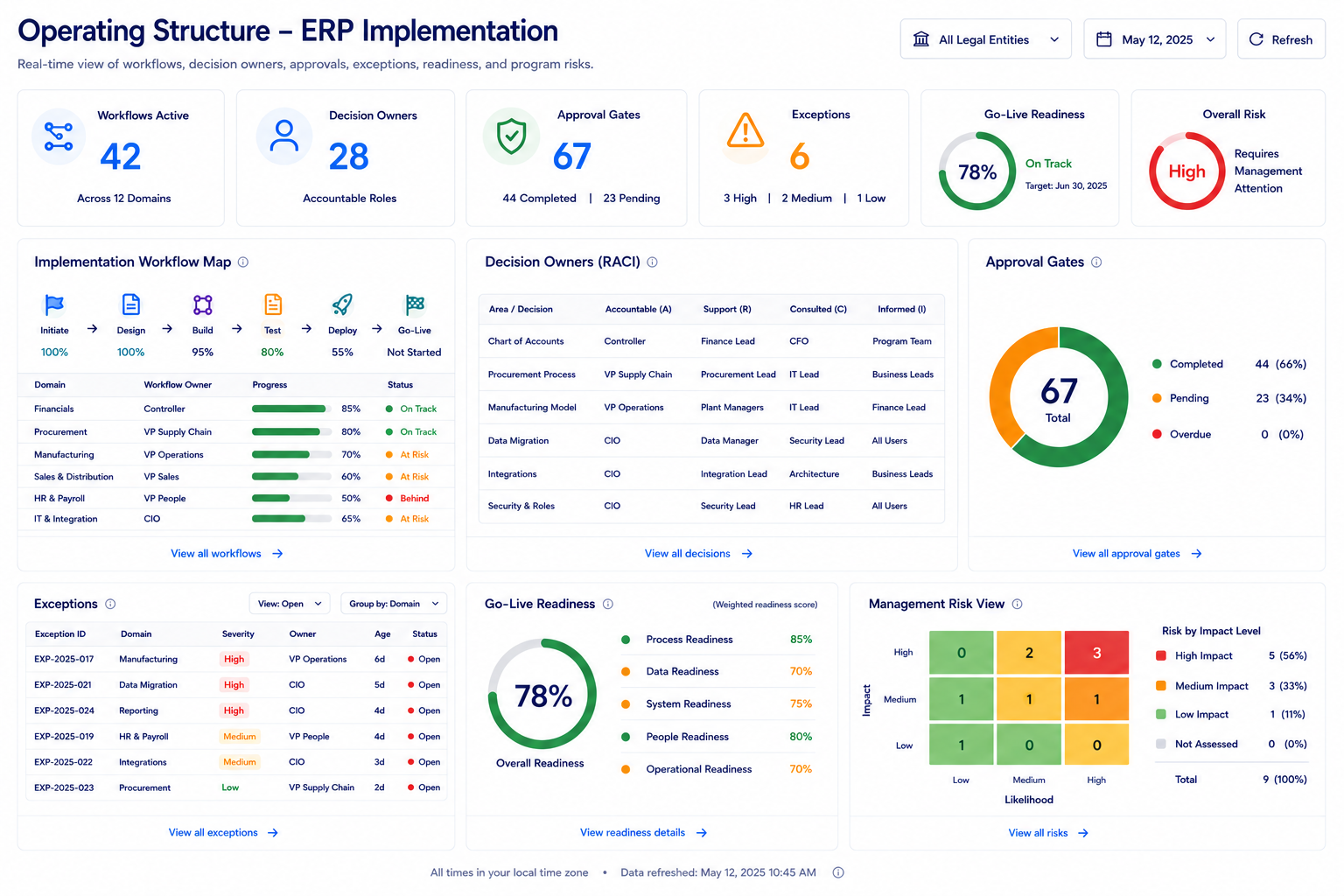
Implementation Should Start With Decision Ownership
ERP implementation should begin by defining who owns the decisions that move the business. Module setup matters, but ownership matters more. A purchase approval, stock allocation, customer credit hold, project cost exception, production release, or billing milestone should not depend on informal judgment after go-live.
A strong implementation plan should define decision ownership before configuration:
Assign workflow owners: Every core process should have a business owner, system owner, and approval owner.
Define movement rules: Clarify what allows a purchase order, work order, shipment, invoice, or project phase to move forward.
Separate normal work from exceptions: Standard transactions should flow quickly, while risk-based exceptions should trigger review.
Connect owners to dashboards: Managers should see which decisions are waiting, who owns them, and what business result is affected.
Block uncontrolled go-live: Make it impossible to approve a workflow for go-live while its key exception path has no owner, approval rule, or reporting view.
Project-Based Businesses Need Committed-Cost Rules
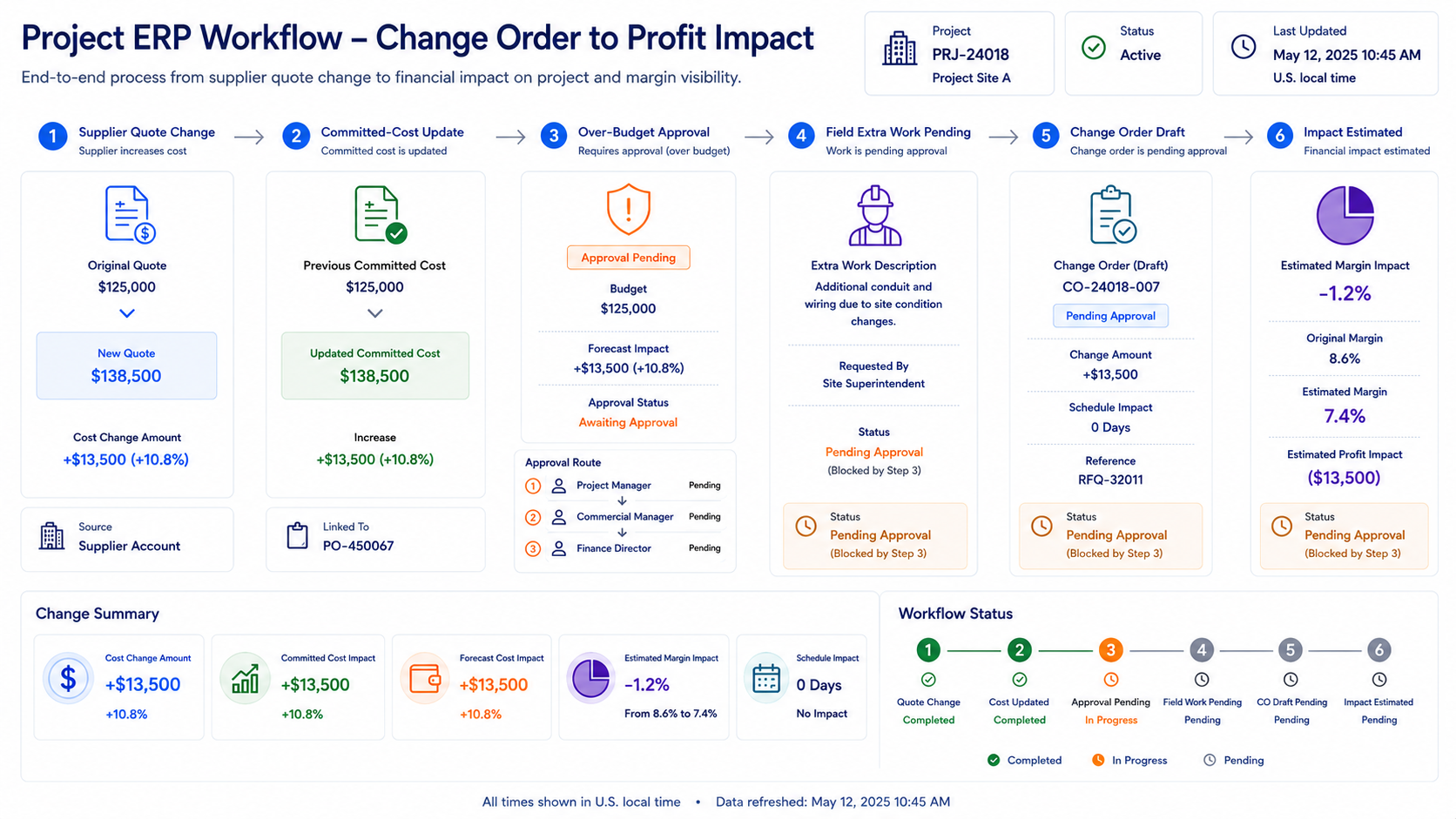
For construction, engineering services, equipment installation, and project-based companies, ERP implementation often fails when project cost control is treated as a finance task only. A project can look profitable while procurement accepts a higher supplier quote, field teams perform extra work, or subcontractor costs increase before invoices are posted. By the time finance sees the impact, the project manager may have already lost control of margin.
ERP should be implemented with committed-cost rules, not just purchase order entry:
Capture cost before invoice: Approved purchase orders, subcontractor commitments, and supplier quote changes should update project cost exposure before invoices arrive.
Route over-budget commitments: Purchases above budget, estimate, or cost-code threshold should require project or finance approval before release.
Connect field changes to cost: Extra field work should create a pending change-order or margin-risk record.
Hold billing confidence: Billing milestones should show whether cost, scope, or approval gaps make the invoice unreliable.
Show margin movement by cause: Dashboards should explain whether margin changed because of procurement, labor, rework, materials, or unapproved scope.
Manufacturing and Distribution Need Master Data Control
ERP implementation becomes weak when master data is treated as a one-time migration task. Item codes, BOM versions, customer terms, vendor lead times, warehouse locations, units of measure, price rules, cost codes, and approval thresholds all shape daily decisions. If these rules are inconsistent, the ERP may process transactions but still create operational confusion.
For a manufacturer, a wrong BOM revision can release the wrong material. For a distributor, incorrect stock status can allow sales to promise inventory that is not usable. For a service company, unclear item categories can make spare parts difficult to reserve, replenish, or bill.
A practical implementation should control master data as an operating asset:
Validate critical records before go-live: Items, customers, vendors, BOMs, warehouses, tax rules, payment terms, and cost structures should be reviewed before transactions depend on them.
Assign data ownership: Each master data category should have an owner who approves creation, changes, and retirement.
Prevent uncontrolled changes: Critical fields should not be changed without workflow, reason, and approval history.
Connect data to business rules: Lead times, item categories, approval levels, credit terms, and replenishment logic should drive real workflows.
Review data after launch: Go-live should be followed by a data-quality review based on actual transaction errors and user feedback.
This prevents ERP from carrying old operating disorder into a new system. Clean master data is not an IT detail; it is the foundation for reliable purchasing, production, inventory, billing, and reporting. Management does not need another dashboard that only shows data completeness percentages and cleansing progress because those numbers merely explain the past. Instead, leaders need a view that shows exactly which master data decisions must be made right now to avoid operational go-live delays.
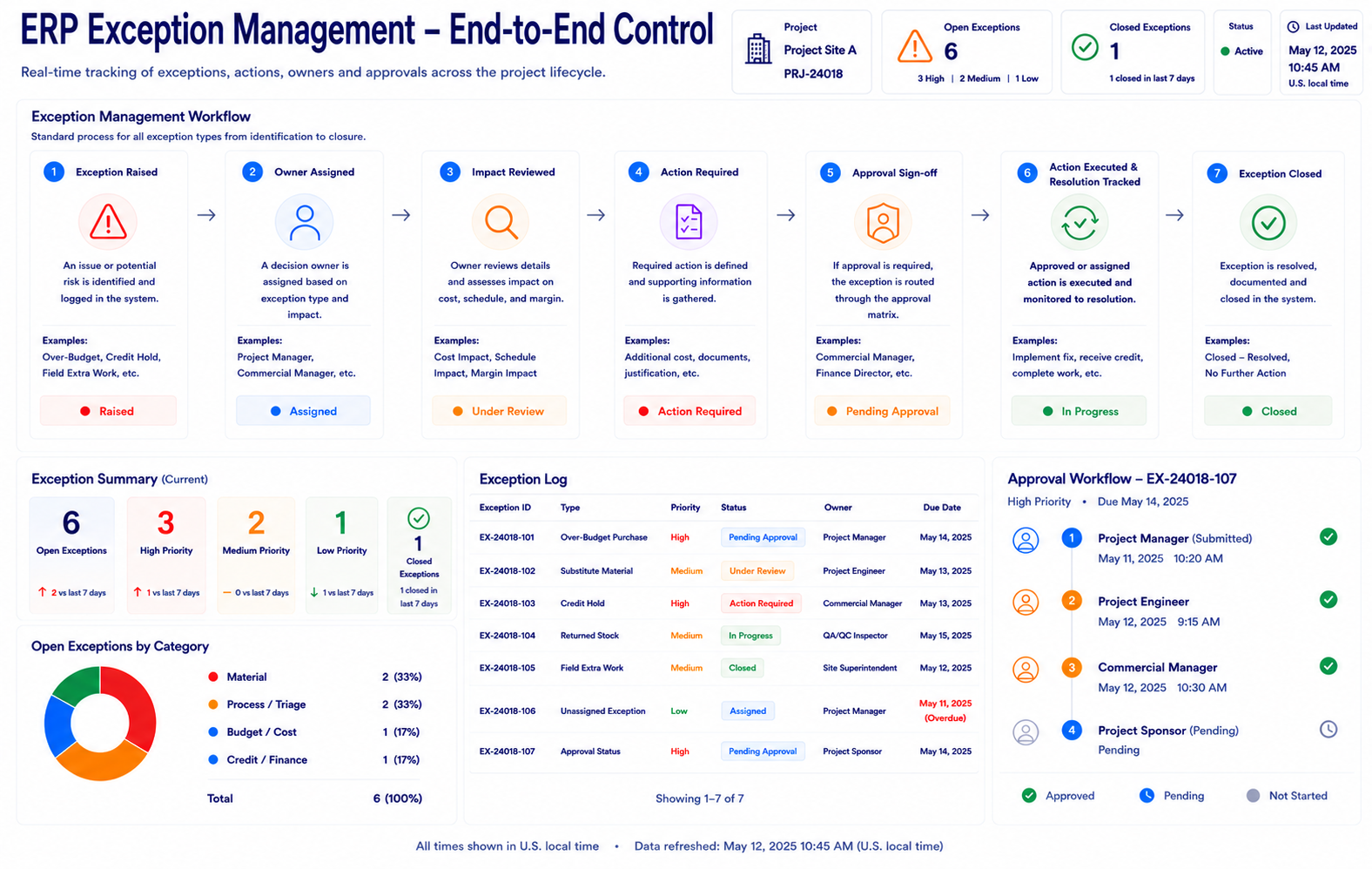
Exceptions Must Stay Inside ERP
Real operations rarely follow a perfect process. A customer asks for extra work before approval. A supplier changes delivery dates. A substitute material is needed. A customer exceeds credit terms. A returned item needs inspection before resale. If ERP cannot handle exceptions, users move the real business outside the system.
ERP implementation should design exception workflows before launch. The goal is not to stop exceptions from happening. The goal is to keep them visible, assigned, approved, and connected to the right business result. Management does not need another dashboard that only shows historical exception volume and resolution times because those numbers merely explain the past. Instead, leaders need a view that shows exactly which unresolved exception decisions must be made right now to keep the business moving.
ERP exception rules should handle:
Over-budget purchasing: Route purchases above threshold before the company is committed.
Substitute materials: Require approval when a replacement affects quality, specification, warranty, or customer commitment.
Credit and billing holds: Block shipment or invoicing when credit, tax, contract, or approval conditions are incomplete.
Inventory exceptions: Hold damaged, returned, reserved, or inspection-pending stock from available inventory.
Field or service exceptions: Turn extra work, rework, missing parts, or customer requests into tracked records with owners and outcomes.
Phased Rollout Should Start Where the Business Hurts Most
A strong ERP implementation strategy does not require every module to go live at once. Many companies create unnecessary risk by trying to change finance, procurement, inventory, projects, service, production, reporting, and integrations in one large push. A phased rollout works better when the first phase targets the workflow where the company is losing the most control.
For a project business, the first phase may be committed-cost visibility and change-order control. For a distributor, it may be inventory availability and purchase planning. For a manufacturer, it may be BOM control, material release, and production costing. For a service company, it may be work orders, spare parts, technician updates, and billing readiness.
A practical rollout should:
Start with one high-impact workflow: Choose the process creating the most delay, cost leakage, or reporting uncertainty.
Define success in operating terms: Use outcomes such as faster approval, fewer stock conflicts, cleaner billing, better margin visibility, or fewer manual reconciliations.
Train by role, not only by module: Buyers, warehouse teams, finance, project managers, technicians, supervisors, and executives need different views and responsibilities.
Stabilize before expanding: Resolve data, workflow, approval, and dashboard issues before adding the next scope.
Keep improvement cycles short: Use go-live feedback to adjust rules, fields, alerts, and reports quickly.
Management Needs an ERP Operating-Readiness View
Management should not judge implementation readiness only by task completion, training attendance, or data migration percentage. Those indicators matter, but they do not prove the business is ready to run through ERP. Leaders need to see whether workflows, owners, rules, exceptions, and dashboards are ready for daily decisions.
A useful ERP operating-readiness view should answer:
Which workflows are ready for go-live, and which still have unresolved blockers?
Which approval paths are incomplete or unclear?
Which master data categories still have quality issues?
Which transactions still depend on spreadsheets, emails, or manual checks?
Which exception workflows have no owner or resolution rule?
Which roles have not completed process-based training?
Which dashboards will management use on day one to monitor risk?
Which workflow should be deployed next after stabilization?
How Industry Software Supports ERP Implementation as an Operating Structure
Industry Software helps organizations turn ERP implementation into a practical operating structure by connecting workflows, ownership, approvals, master data, exceptions, integrations, dashboards, and role-based usage. Management does not need another dashboard that only shows project milestones, go-live dates, and budget burn rates because those numbers merely explain the past. Instead, leaders need a view that shows exactly which deployment and operational decisions must be made right now to ensure business continuity.
The platform helps companies:
Start with the most urgent workflow: Deploy by module, such as procurement control, inventory visibility, project costing, production coordination, service operations, billing readiness, or executive dashboards.
Configure rules around real operations: Adjust approval paths, cost codes, inventory allocation, field workflows, item logic, billing rules, exception handling, and reporting views around the company’s actual process.
Use cloud-based access: Keep office teams, field teams, warehouses, plants, service locations, finance, and management working from updated operational information.
Support customer-specific customization: Adapt workflows, forms, roles, alerts, dashboards, and integrations to the way the company operates.
Provide responsive implementation support: Help teams refine workflows, resolve adoption issues, and adjust configuration after real users begin working in the system.
Improve control with cost-effective deployment: Use practical scope, modular rollout, and focused implementation to improve ERP value without unnecessary disruption.
With Industry Software, companies can turn ERP into the way work moves, exceptions are controlled, decisions are owned, and managers see risk earlier. ERP implementation without operating rules creates another database; ERP implementation with shared logic creates a scalable business foundation.