Results Snapshot
Project managers gained faster visibility into active sites, open field tasks, and customer changes that needed attention
Project phases, budgets, timelines, and work orders became easier to review in one execution flow
Material, labor, overhead, and actual spend movement became visible earlier during active work
Technician assignments and field task status became easier to track across multiple sites
Customer-driven scope changes became formal records tied to value, approval, and execution
Customer Profile
The customer is a commercial space services contractor supporting retail stores, offices, and small commercial spaces. The company handles renovation, repair, installation, closeout, and customer-requested work across multiple locations. Projects move quickly, field tasks often depend on technician availability, and customer changes can appear while work is already underway.
The team includes project managers, field technicians, finance users, and management. Project managers need to know which site is moving, which one is blocked, and which task needs the next action. Field technicians need clear work instructions before arriving on-site, while finance and management need earlier visibility into cost movement, approved changes, and operational risk across active work.
The main challenge was not creating projects. The contractor already had project work moving in the field. The issue was that field progress, budgets, timelines, work orders, technician assignments, and change requests were not connected clearly enough for the office to see where work was stuck and what needed attention next.
Field Work Was Moving, but Visibility Was Fragmented
Project managers were tracking several sites at once. One retail project might be waiting for a technician, another office project might be waiting on materials, a closeout work order might still need field feedback, and another customer might have requested additional work. Work was moving, but the real picture was scattered across calls, messages, spreadsheets, and personal notes.
This affected both delivery and margin. If task instructions were unclear, technicians had to ask again after arriving on-site. If cost movement appeared too late, margin could be consumed by material and labor changes. If customer changes were not formally recorded, billing and responsibility became harder to manage.
For this contractor, execution needed to move away from “the project manager asks everyone for updates.” The team needed a workflow where project status, field work, budgets, technician assignments, and change records could show what needed attention before delays or cost issues became harder to correct.
Seeing Which Sites Needed Attention First
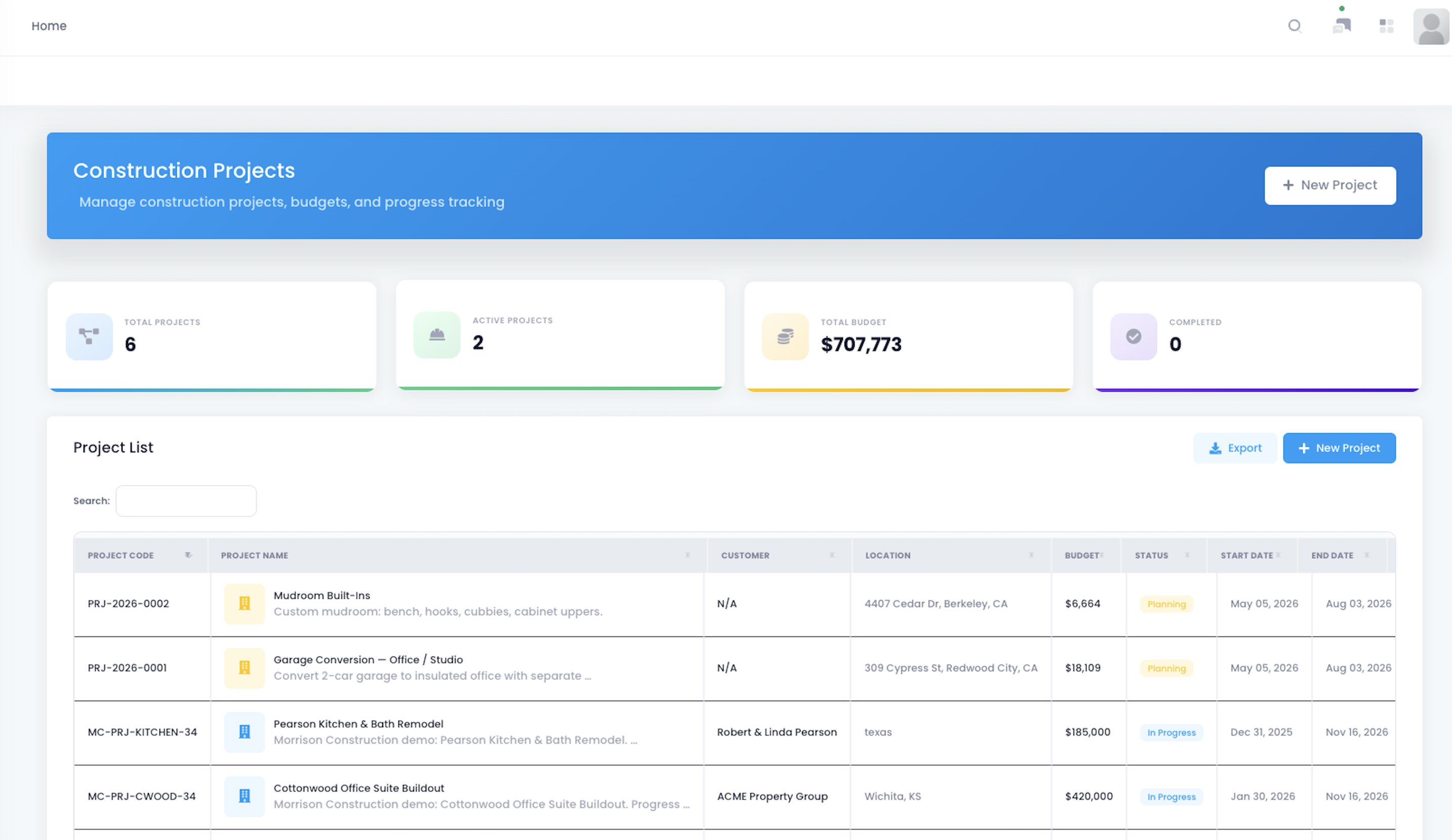
The team used the project overview page to monitor all active commercial projects in one place. Project managers could see project names, customers, status, progress, budget, and key execution information from the list, then identify which sites were moving normally and which required immediate follow-up. At the start of the day, they no longer had to check messages, ask field crews, and open multiple spreadsheets before deciding where to focus.
The practical value was prioritization. A project list was no longer just a record of active work; it became a daily operating view. Project managers could scan for stalled sites, projects with slow progress, budget pressure, or missing next steps before calling technicians or customers.
For a contractor managing multiple commercial spaces, this matters because attention is limited. The team does not only need to know how many projects are active. It needs to know which project needs action today, which one can keep moving, and which one may affect schedule, cost, or customer satisfaction if left unchecked.
Keeping Progress, Budget, and Revenue Together
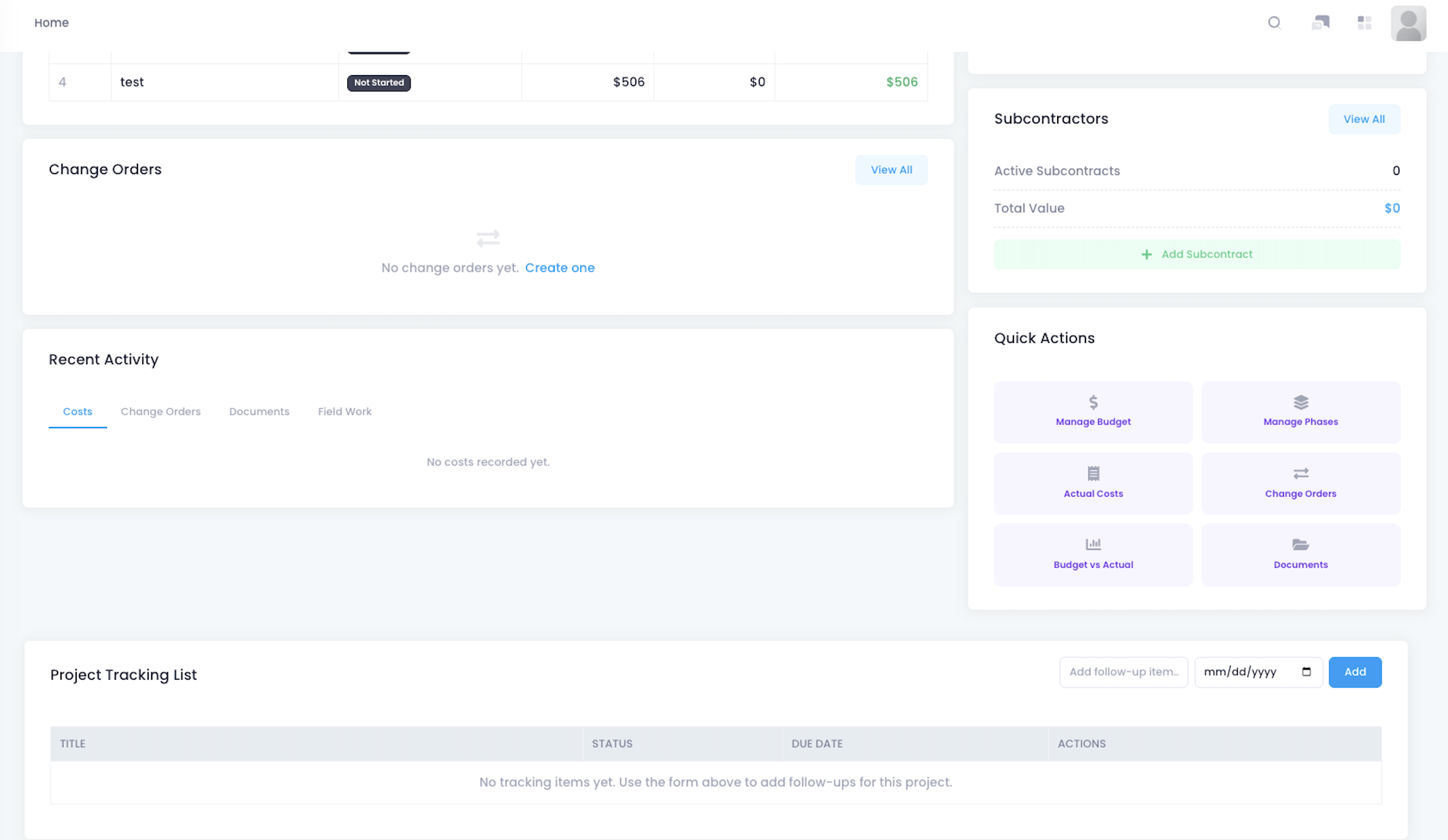
Inside the project detail page, the team reviewed budget, actual spend, contract revenue, projected profit, phases, and financial breakdown in one place. For project managers, this page became the daily entry point for understanding project health. Once a store or office project moved into execution, the manager could see field progress, budget pressure, and revenue context together instead of chasing them across separate files.
This reduced repeated confirmation between project management and finance. Previously, the project manager might know field progress but not immediately see budget pressure, while finance might see cost changes without knowing whether the work was in demolition, installation, closeout, or rework. With project detail in one place, the team could judge whether cost movement matched the current stage of work.
Commercial space projects often involve schedule pressure and budget movement at the same time. Customers may care about opening timelines, site disruption, and approved costs, while internal teams need to understand labor, materials, revenue, and margin together. Keeping these details on one project page made project health easier to evaluate before issues reached closeout.
Making Project Phases Easier to Control
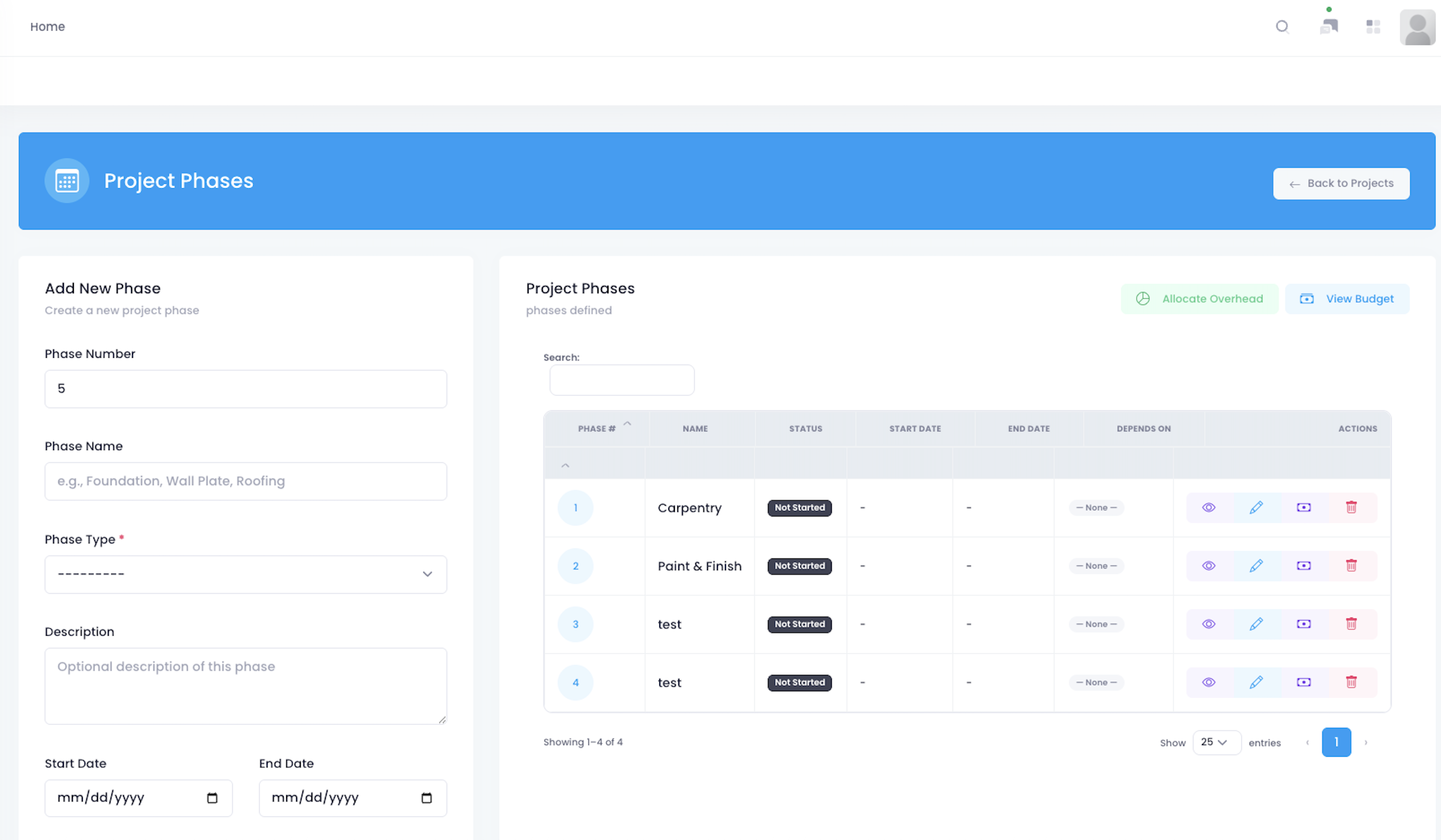
Commercial space projects usually follow a clear sequence, such as site preparation, demolition, utility adjustment, installation, inspection, closeout, and customer acceptance. The team used phase management to break each project into trackable steps instead of describing everything as simply “in progress.” Project managers could see which phase each site was in and what trade, material, or owner needed to be involved next.
This helped the team reduce waiting between phases. Previously, a project might be marked active, but the manager still had to ask whether the site was waiting on materials, waiting for a technician, waiting for customer confirmation, or ready for the next step. Once phases were separated, the team could see which step was complete, which was blocked, and which needed the next resource.
Many project delays do not happen because no one is working. They happen because the handoff from one phase to the next is unclear. Phase management gave project managers a clearer way to schedule people, check prerequisites, and explain progress to customers without rebuilding the project status from scattered updates.
Catching Material and Labor Drift Earlier
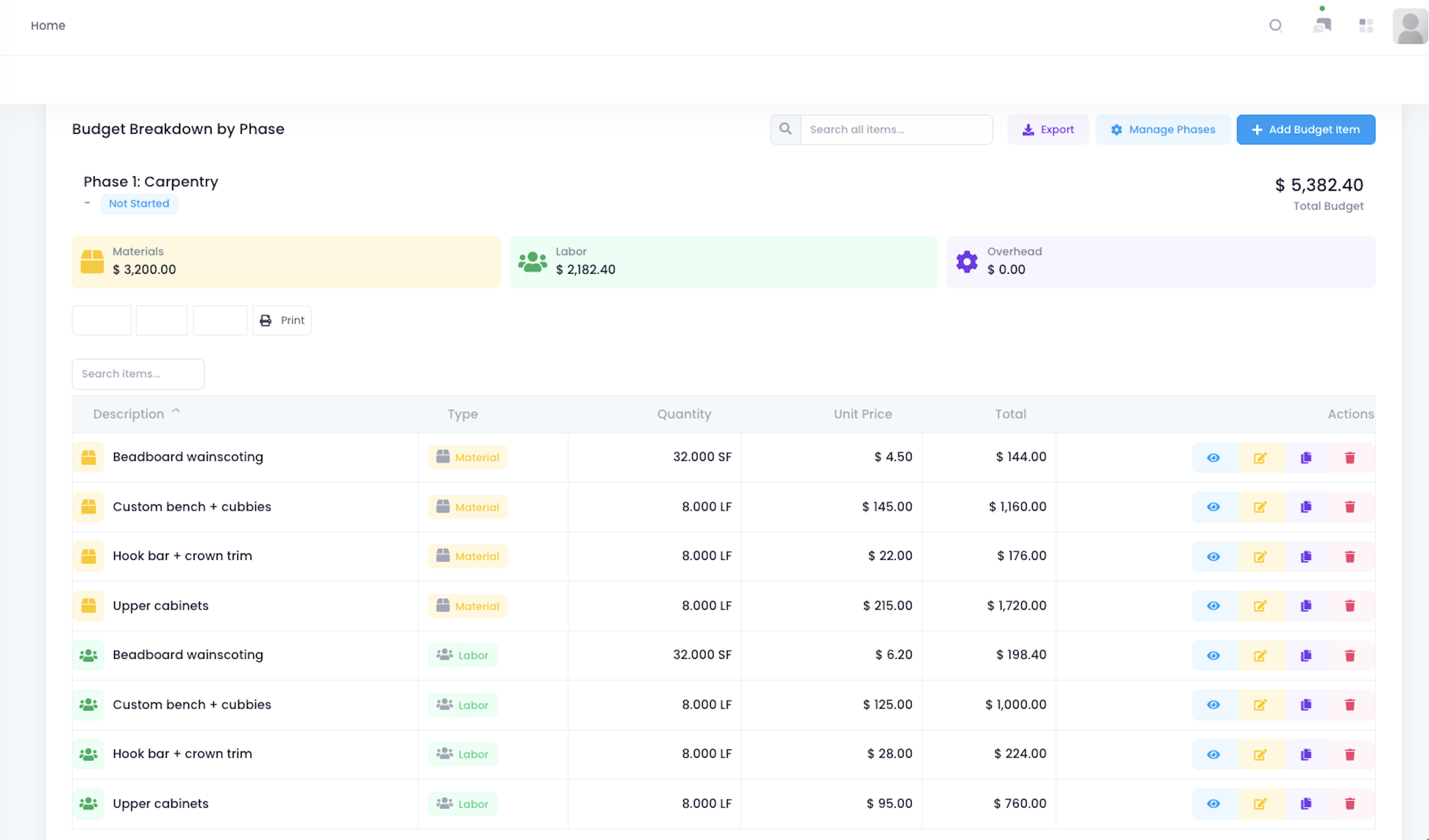
During execution, the team used the budget page to monitor total budget, material budget, labor budget, overhead, and actual spend performance. Budget was no longer only something to review after completion; it became a control point during the work. Project managers could compare actual spend against budget categories and see which costs were approaching limits.
This gave the contractor earlier visibility into cost pressure. If a store site required a material substitution, the project manager could check whether the material budget could absorb it. If technician waiting time increased, labor spend could rise faster than planned. If actual spend approached the budget limit, management could decide sooner whether a customer conversation, scope adjustment, or change order was needed.
The budget view helped the team move from after-the-fact review to active cost control. Site conditions could still change, but material, labor, overhead, and actual spend were visible during execution. That made it easier to protect margin before the project reached completion.
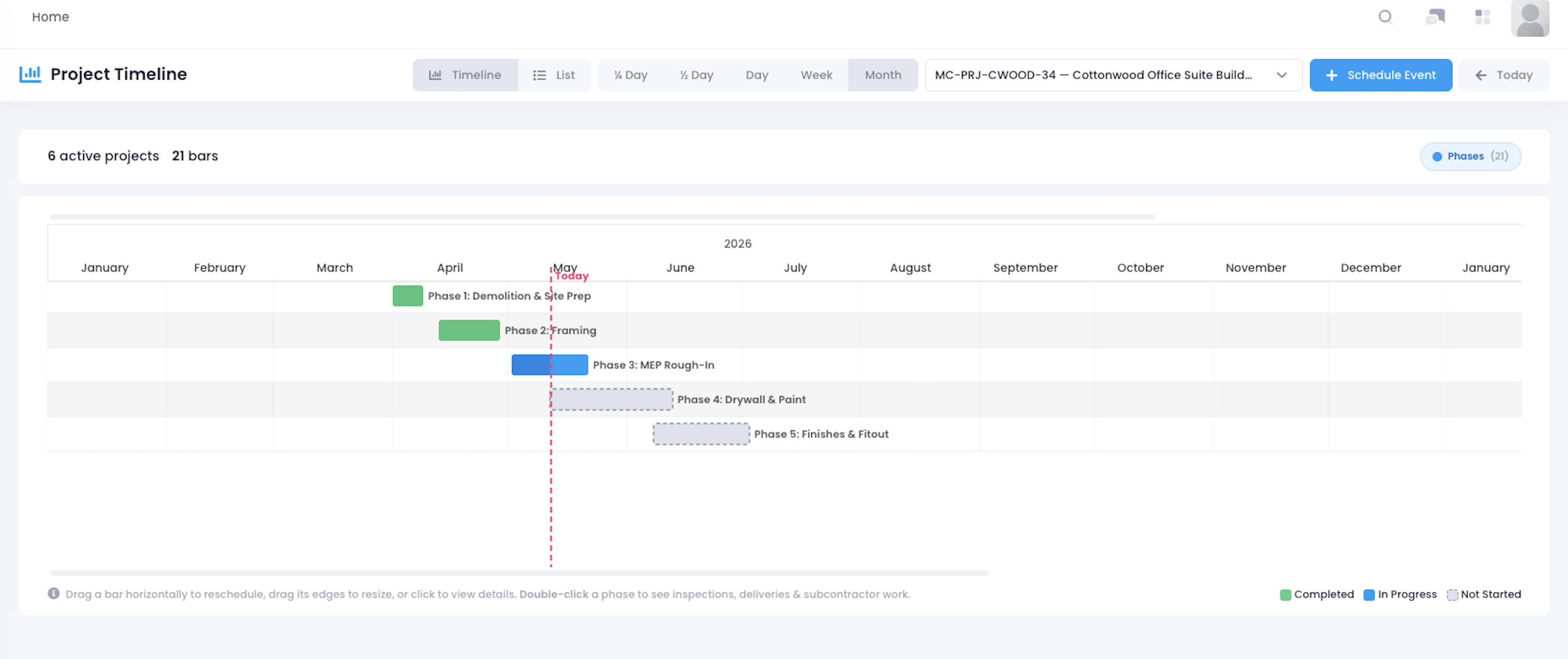
Putting Multiple Site Schedules on One Line
To reduce scheduling confusion, the team used project timelines to review key milestones and planned work. Project managers could place phases, dates, field tasks, and delivery points on one timeline, then see which work needed to happen first and which tasks could affect later steps. For a team managing several projects at once, the timeline connected people, materials, and customer site windows.
This reduced last-minute questions about who should go where. Previously, project managers often had to piece together the daily plan from chat messages, calendars, and work orders, while field crews might not know whether a project was ready for the next phase. With the timeline in place, the team could see which tasks should move forward and which were still waiting on prerequisites.
For commercial spaces, scheduling is not just placing dates on a calendar. Work may depend on business hours, customer site access, material readiness, phase completion, and technician availability. A timeline made those dependencies easier to see and easier to communicate.
Turning Office Plans into Field Work Orders
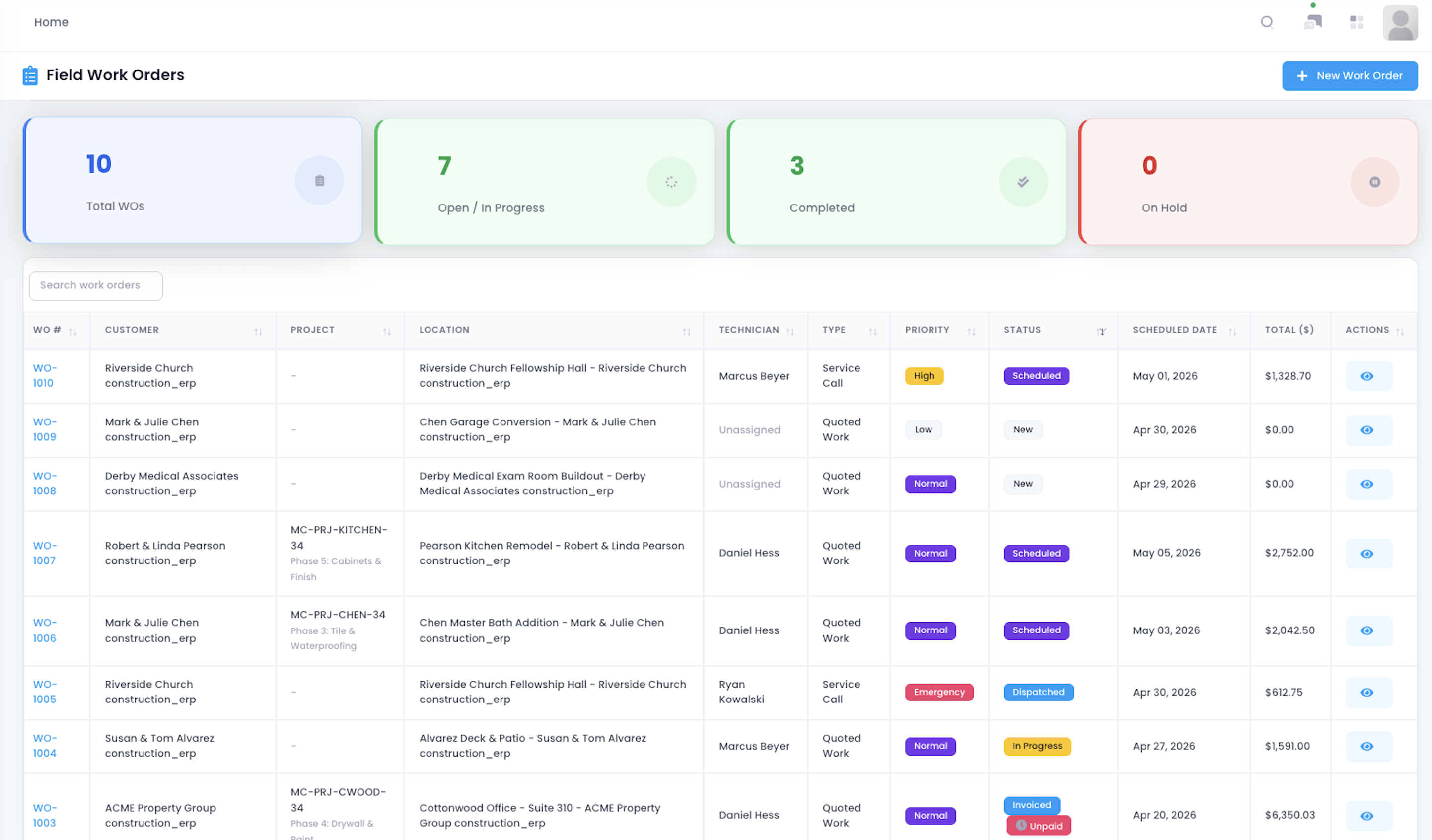
Once work moved into the field, the team used the work order list to manage tasks that needed assignment and tracking. Work orders carried specific field activities such as installation, repair, inspection, closeout, rework, or customer-requested items. Project managers could see which tasks had been created, which were in progress, and which still required technician completion or feedback.
This connected office planning with field execution. Instead of relying only on verbal instructions or scattered messages, project managers could turn project needs into assignable work items. Field teams could execute from the work order, while project managers could track whether the task was still open, in progress, or completed.
For service-oriented construction teams, work orders create an important bridge between the office and the field. A project plan only becomes useful when it can be translated into specific tasks with ownership, status, and feedback. This made field progress easier to monitor and reduced the risk of tasks being discussed but not formally assigned.
Giving Technicians Better Context Before Arrival
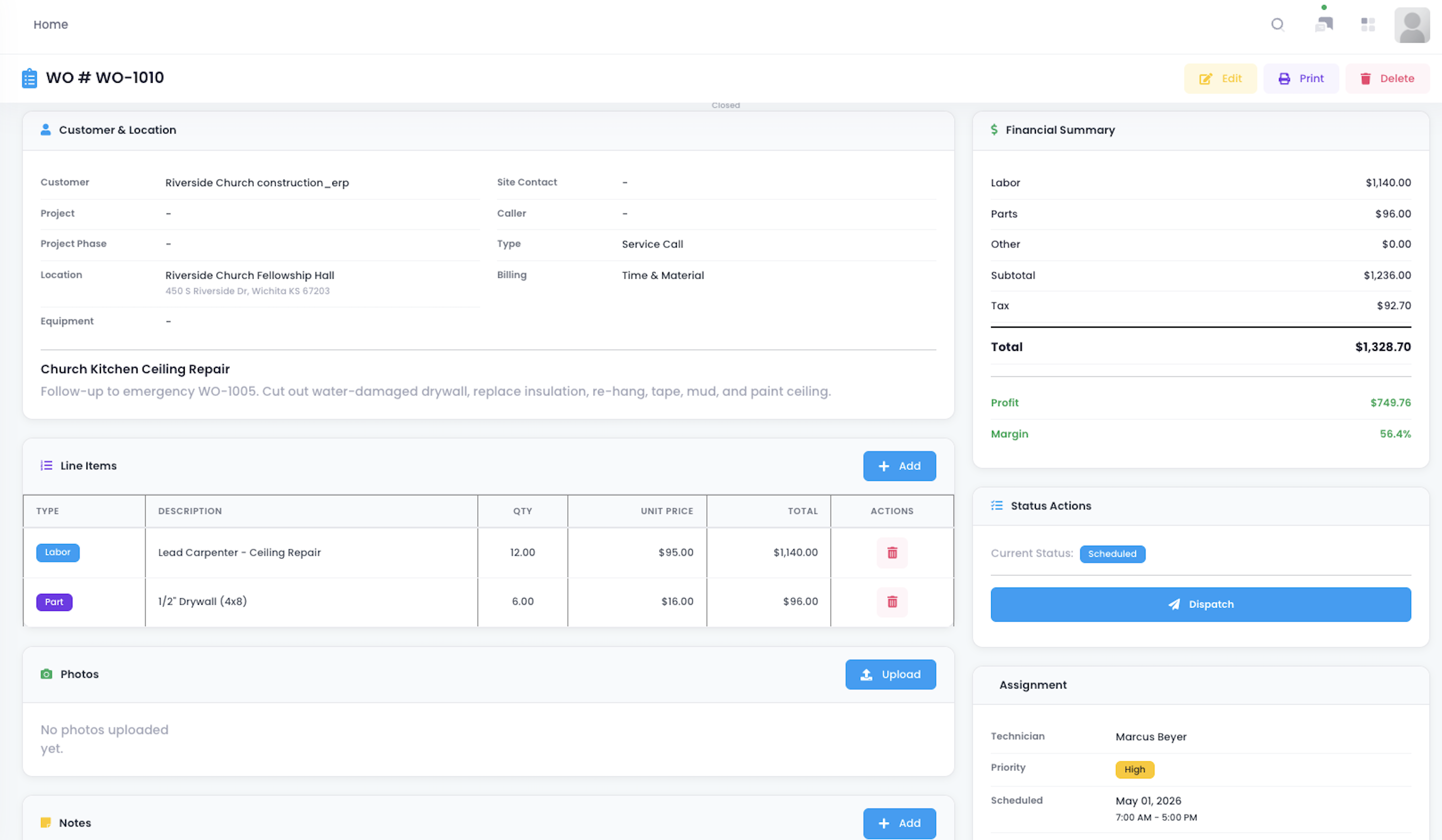
Inside each work order, the team could review task instructions, linked project, customer or location details, status, and execution requirements. For technicians, this was more useful than a message saying, “Go handle this on-site,” because it explained what needed to be done, where it belonged, which project it supported, and what feedback was needed afterward. Project managers could add details to reduce callbacks after the technician arrived.
This made field communication more specific. Previously, technicians might need to ask for the customer address, whether the task was a repair or closeout item, whether photos or notes were required, or which project phase the task supported. With work order detail available before arrival, technicians could prepare with better context and fewer clarification loops.
Clear task detail also supported more consistent execution. When technicians understand the scope, location, project link, and required follow-up, the office gets better feedback and the field team spends less time chasing missing instructions. For a contractor managing many active jobs, that clarity reduces friction across the day.
Making Technician Assignments More Visible
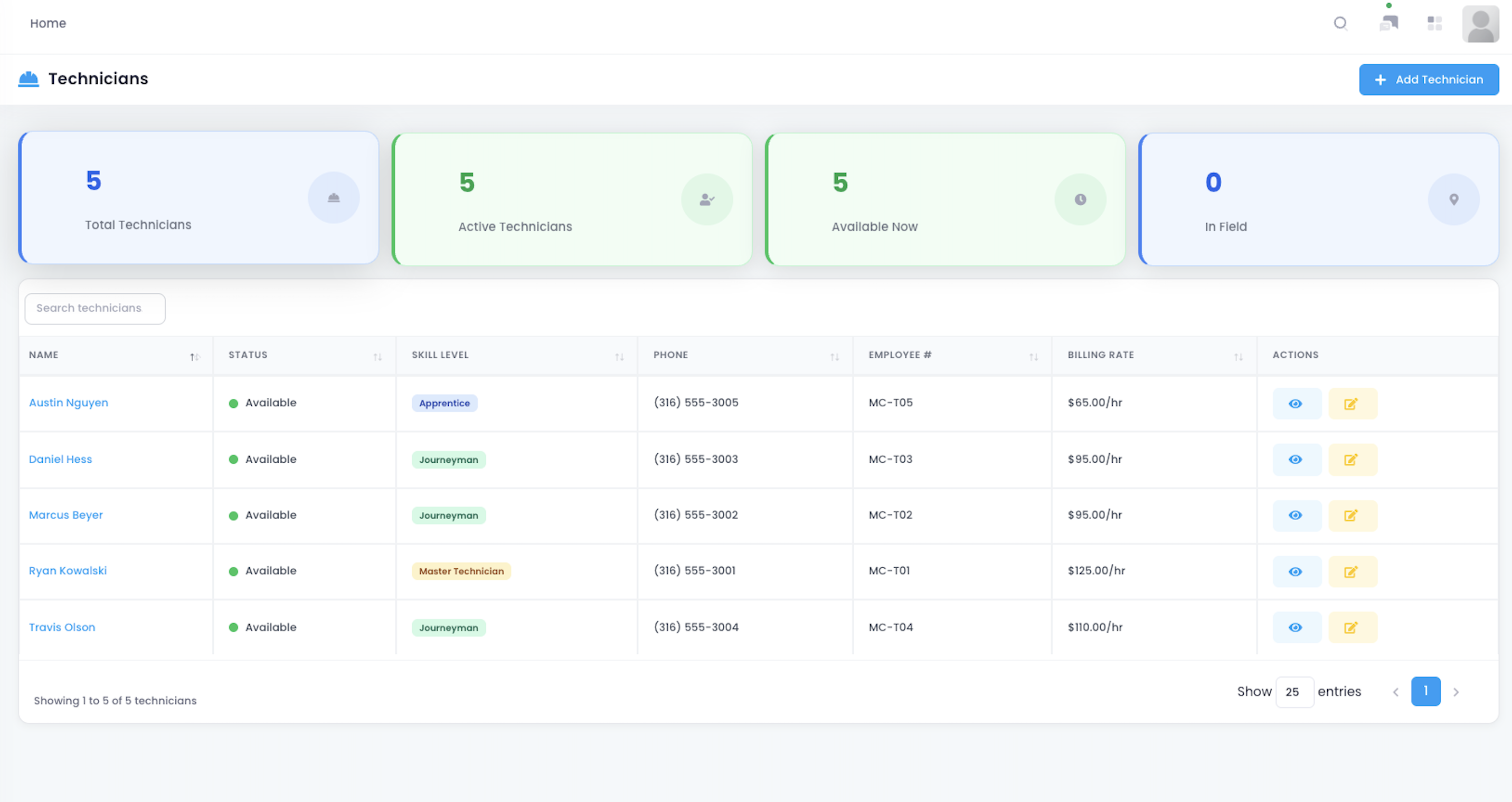
To support field work orders, the team used the technician management page to review personnel, assignments, and availability. Project managers could see which technicians were suited for certain tasks, who was already assigned, and which site still needed coverage. For a contractor running multiple projects at once, unclear staffing can disrupt the entire field plan.
This reduced last-minute staffing calls. Previously, project managers might need to ask who was available, who had the right skill, or who was closest to the site. With technician information and assignments in one place, the project manager could match the right person to the right work order faster.
Project progress depends not only on whether a task exists, but also on whether the right person can complete it at the right time. Technician visibility helped the team reduce delays caused by missing ownership, wrong assignments, or unclear availability.
Turning Customer Changes into Formal Records
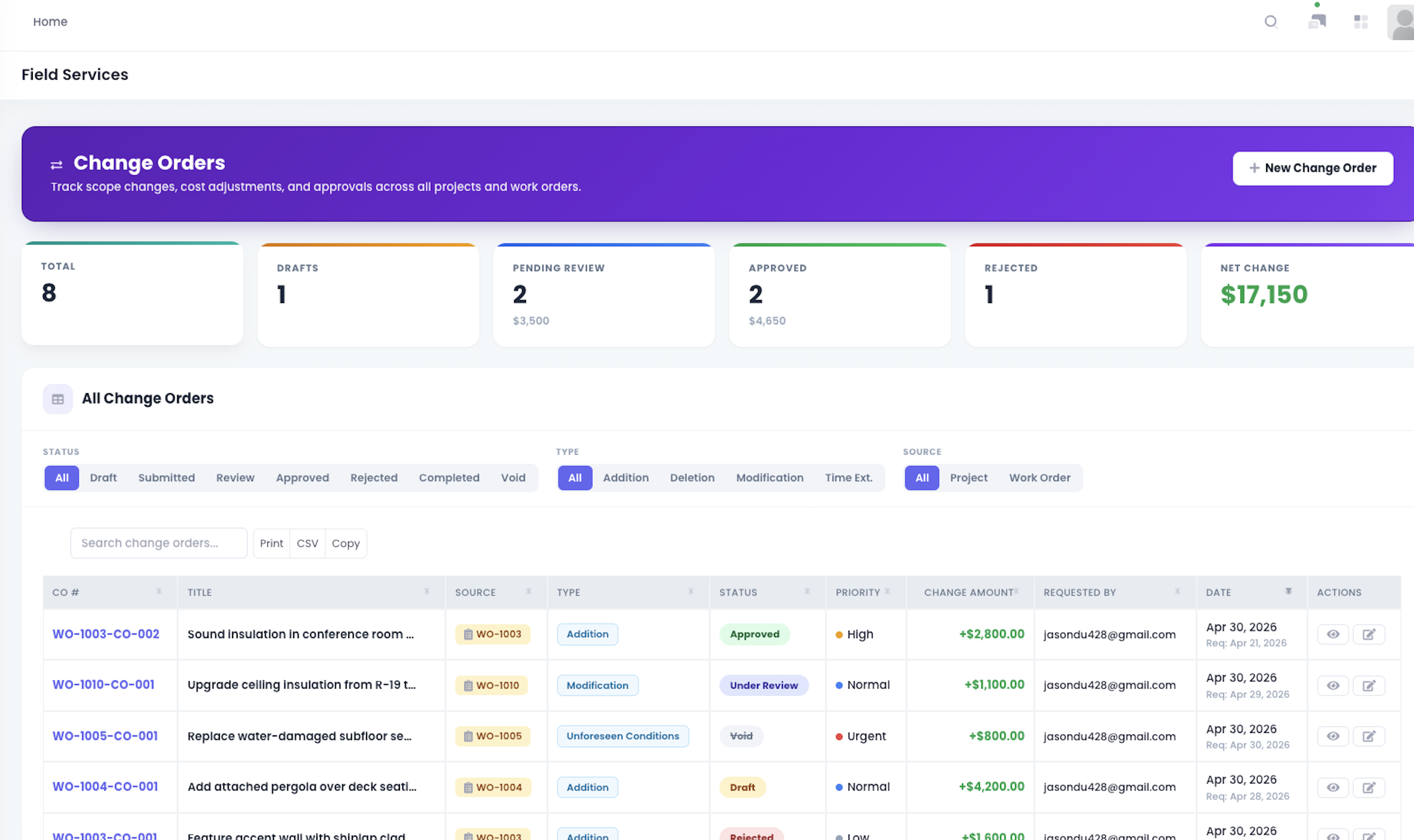
During commercial project execution, customers often request scope changes, such as added installation work, material upgrades, location adjustments, or extra closeout items. The team used the change order list to manage these requests and see which changes were still drafts, which were pending approval, and which had been approved. Changes no longer lived only in calls, texts, or on-site conversations; they became part of the project record.
This reduced the risk of informal changes. Previously, a customer might say on-site, “Can you also add this?” and if the project manager did not record it quickly, the team could later face scope, value, and responsibility disputes. With change orders, each request could enter the list, project managers could track status, finance could watch value impact, and customer-facing staff could confirm approval.
Customer requests are not the problem. Unrecorded requests are the problem. A change order list turned scope movement into trackable items, helping the contractor protect project value and avoid end-of-project arguments about what should have been billed.
Aligning Scope, Value, and Approval
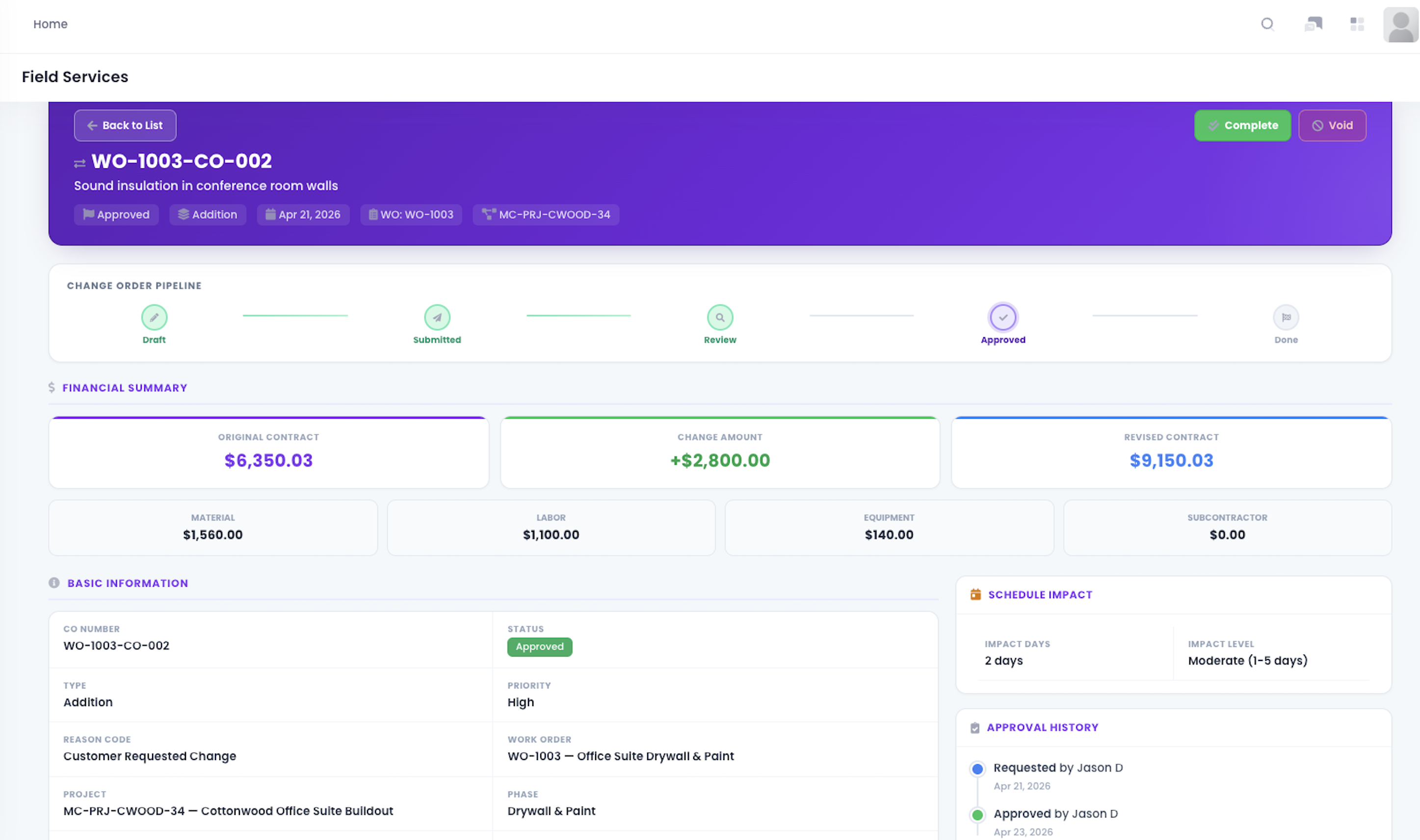
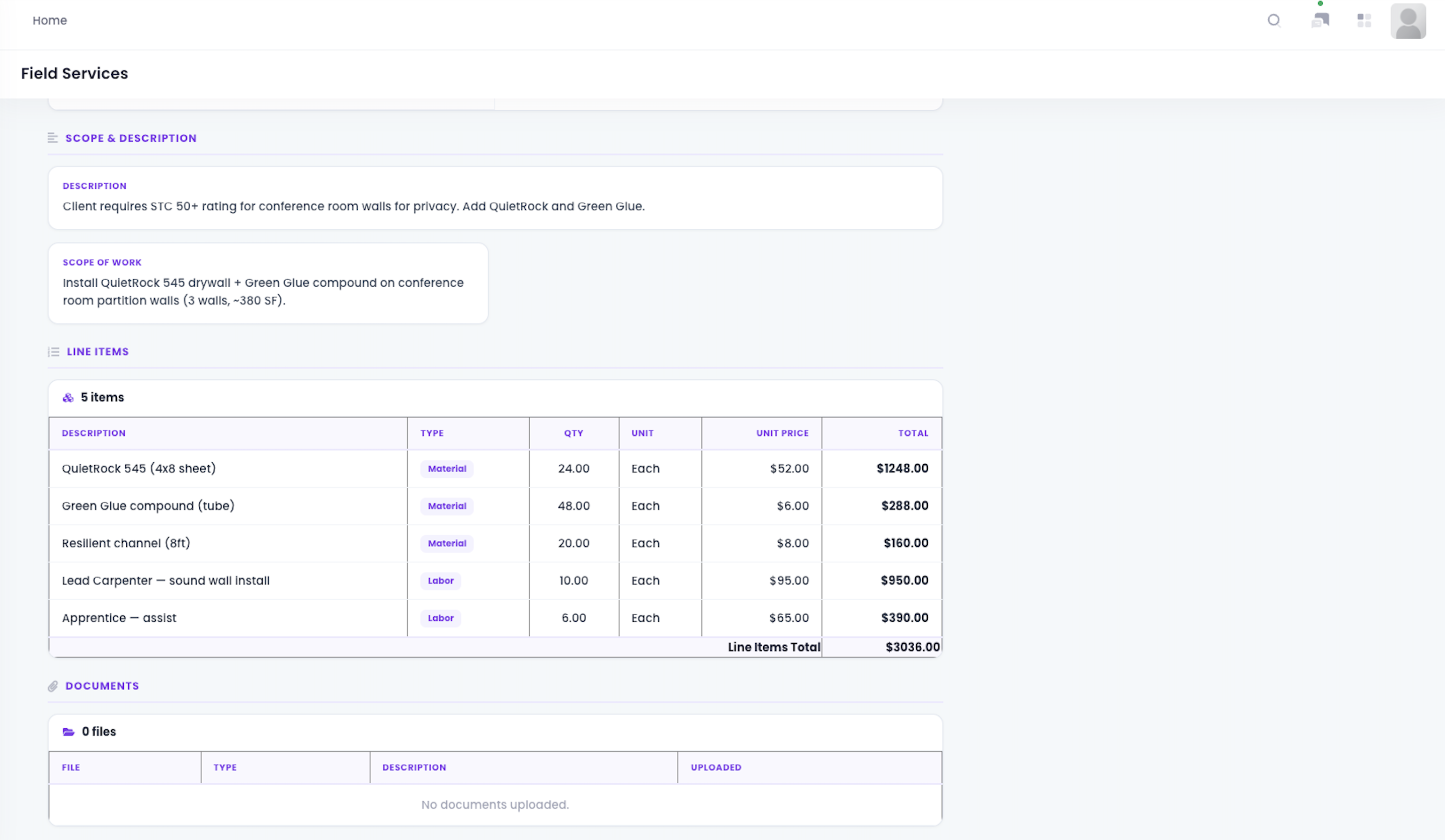
Inside the change order detail page, the team could record the change description, value impact, project link, approval status, and execution information. The project manager could turn a customer request into a defined change item, finance could see value impact, and management could decide whether the change should move forward. The detail page gave customer communication, internal review, and field execution one shared reference point.
This gave the contractor more control when handling changes. Previously, teams might perform extra work first and add pricing or approval later, making payment harder. Now the change could be recorded with scope, value, and status before execution moved forward, reducing the risk that customer requests became unpriced work.
The two change order views helped support both control and follow-through. One view showed the change as a managed record, while the detail view helped connect description, approval, value, and execution context. This made change management less dependent on memory and more tied to the project record.
Implementation and Adoption
The workflow was adopted around how the contractor already managed projects, field tasks, and customer changes. Project managers continued overseeing active work, but they now had a clearer structure for project status, phases, budgets, timelines, work orders, technician assignments, and change records. Field technicians continued executing tasks, but work orders provided clearer instructions and context before arriving on-site.
Adoption worked because the workflow followed the contractor’s real operating rhythm. Project managers did not need to create a separate status report for every project update. Work orders, timelines, budgets, and change records became part of the same execution flow. Finance gained earlier visibility into budget movement and approved changes without waiting until the project was nearly complete.
The most important shift was operational discipline. The team moved from asking for updates after issues appeared to reviewing project status, task ownership, cost movement, and change control while work was still active. That made the system useful not only for recordkeeping, but for daily execution management.
Measured Outcomes
The contractor’s improvement came from connecting several parts of execution, not from one isolated feature. Project views, phases, budgets, timelines, work orders, technicians, and change orders worked together to give the office a more reliable view of what was happening in the field.
Key outcomes included:
Project managers could identify stuck sites and open field tasks earlier
Field work orders made task ownership and status easier to track
Technicians had clearer project and task context before arriving on-site
Budget views helped the team monitor material, labor, overhead, and actual spend during execution
Timelines helped connect project phases, milestones, and site access windows
Change orders created formal records for customer-driven scope and value changes
Finance gained earlier visibility into budget pressure and approved change impact
Management gained a clearer view of project execution risk across multiple sites
These outcomes mattered because commercial space services often involve many moving parts at once. The contractor did not eliminate field variability, but it gained a stronger way to see, assign, document, and respond to issues before they became larger project risks.
Broader Business Impact
After the workflow change, project managers no longer relied only on messages and meetings to track progress. They could move from the project overview into project details, phases, budgets, timelines, work orders, technicians, and change records. Field teams could execute from work orders, technician assignments were clearer, and finance could see the impact of budgets and changes earlier.
For management, the larger value was earlier project risk visibility. Phases showed field progress, budgets showed cost variance, work orders showed field tasks, and change orders showed scope and value movement. Field conditions could still change, but the team no longer had to wait until the project was nearly finished to understand where the issue had started.
The same workflow logic can apply to many construction and facility service businesses managing multiple active sites, field teams, and frequent customer changes. When project execution depends on schedule, people, budget, and scope control, those records need to move together. Keeping them connected gives the team a stronger way to move field work forward.
Client Quote
“Before, when several projects were running at once, the project manager had to chase field updates, and finance had to wait for changes and costs to catch up later. Now projects, work orders, budgets, and changes connect in one flow. If something is stuck, needs more money, or needs a technician, the team can react earlier.”
From Field Updates to Execution Control
For this commercial space services contractor, the value was not simply putting project information into a system. It was connecting project overview, phases, budgets, timelines, field work orders, technician assignments, and change orders into one execution flow. That connection helped the team understand what was happening in the field while there was still time to act.
Project managers no longer relied on verbal updates to track progress. Field teams no longer received tasks only through scattered messages. Finance no longer waited until late in the project to understand cost and change impact. By keeping execution details connected, the contractor gained earlier risk visibility and a stronger way to control field work, budget movement, and customer-driven changes.